A Claude Code plugin that automatically captures everything Claude does during your coding sessions, compresses it with AI (using Claude's agent-sdk), and injects relevant context back into future sessions.


🇨🇳 中文 • 🇹🇼 繁體中文 • 🇯🇵 日本語 • 🇵🇹 Português • 🇧🇷 Português • 🇰🇷 한국어 • 🇪🇸 Español • 🇩🇪 Deutsch • 🇫🇷 Français • 🇮🇱 עברית • 🇸🇦 العربية • 🇷🇺 Русский • 🇵🇱 Polski • 🇨🇿 Čeština • 🇳🇱 Nederlands • 🇹🇷 Türkçe • 🇺🇦 Українська • 🇻🇳 Tiếng Việt • 🇵🇭 Tagalog • 🇮🇩 Indonesia • 🇹🇭 ไทย • 🇮🇳 हिन्दी • 🇧🇩 বাংলা • 🇵🇰 اردو • 🇷🇴 Română • 🇸🇪 Svenska • 🇮🇹 Italiano • 🇬🇷 Ελληνικά • 🇭🇺 Magyar • 🇫🇮 Suomi • 🇩🇰 Dansk • 🇳🇴 Norsk
Persistent memory compression system built for Claude Code.





|
|
Quick Start • How It Works • Search Tools • Documentation • Configuration • Troubleshooting • License
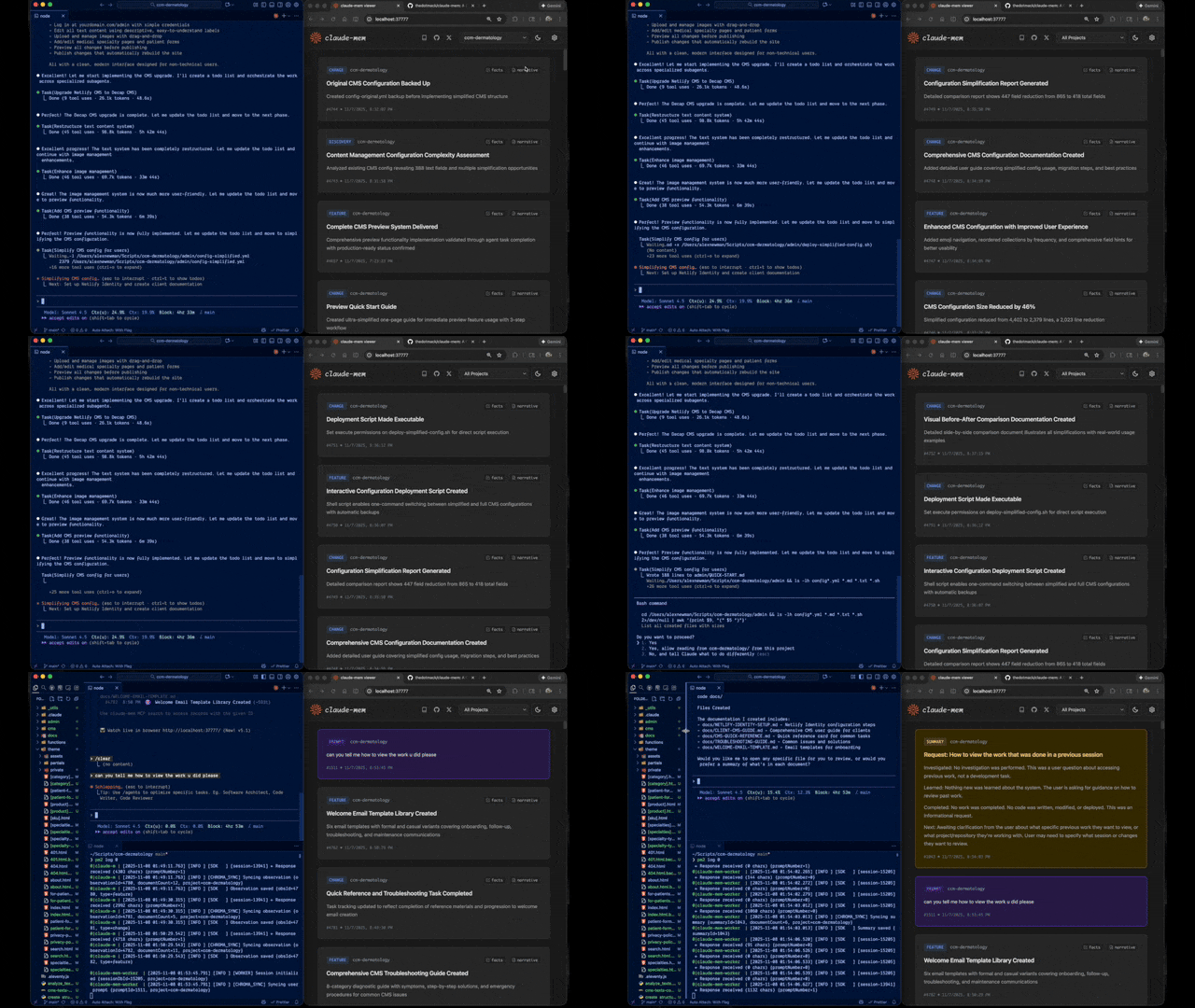
Claude-Mem seamlessly preserves context across sessions by automatically capturing tool usage observations, generating semantic summaries, and making them available to future sessions. This enables Claude to maintain continuity of knowledge about projects even after sessions end or reconnect.
Quick Start
Start a new Claude Code session in the terminal and enter the following commands:
/plugin marketplace add thedotmack/claude-mem

/plugin install claude-mem
Restart Claude Code. Context from previous sessions will automatically appear in new sessions.
Note: Claude-Mem is also published on npm, but
npm install -g claude-meminstalls the SDK/library only — it does not register the plugin hooks or set up the worker service. To use Claude-Mem as a plugin, always install via the/plugincommands above.
🦞 OpenClaw Gateway
Install claude-mem as a persistent memory plugin on OpenClaw gateways with a single command:
curl -fsSL https://install.cmem.ai/openclaw.sh | bash
The installer handles dependencies, plugin setup, AI provider configuration, worker startup, and optional real-time observation feeds to Telegram, Discord, Slack, and more. See the OpenClaw Integration Guide for details.
Key Features:
- 🧠 Persistent Memory - Context survives across sessions
- 📊 Progressive Disclosure - Layered memory retrieval with token cost visibility
- 🔍 Skill-Based Search - Query your project history with mem-search skill
- 🖥️ Web Viewer UI - Real-time memory stream at http://localhost:37777
- 💻 Claude Desktop Skill - Search memory from Claude Desktop conversations
- 🔒 Privacy Control - Use
<private>tags to exclude sensitive content from storage - ⚙️ Context Configuration - Fine-grained control over what context gets injected
- 🤖 Automatic Operation - No manual intervention required
- 🔗 Citations - Reference past observations with IDs (access via http://localhost:37777/api/observation/{id} or view all in the web viewer at http://localhost:37777)
- 🧪 Beta Channel - Try experimental features like Endless Mode via version switching
Documentation
📚 View Full Documentation - Browse on official website
Getting Started
- Installation Guide - Quick start & advanced installation
- Usage Guide - How Claude-Mem works automatically
- Search Tools - Query your project history with natural language
- Beta Features - Try experimental features like Endless Mode
Best Practices
- Context Engineering - AI agent context optimization principles
- Progressive Disclosure - Philosophy behind Claude-Mem's context priming strategy
Architecture
- Overview - System components & data flow
- Architecture Evolution - The journey from v3 to v5
- Hooks Architecture - How Claude-Mem uses lifecycle hooks
- Hooks Reference - 7 hook scripts explained
- Worker Service - HTTP API & Bun management
- Database - SQLite schema & FTS5 search
- Search Architecture - Hybrid search with Chroma vector database
Configuration & Development
- Configuration - Environment variables & settings
- Development - Building, testing, contributing
- Troubleshooting - Common issues & solutions
How It Works
Core Components:
- 5 Lifecycle Hooks - SessionStart, UserPromptSubmit, PostToolUse, Stop, SessionEnd (6 hook scripts)
- Smart Install - Cached dependency checker (pre-hook script, not a lifecycle hook)
- Worker Service - HTTP API on port 37777 with web viewer UI and 10 search endpoints, managed by Bun
- SQLite Database - Stores sessions, observations, summaries
- mem-search Skill - Natural language queries with progressive disclosure
- Chroma Vector Database - Hybrid semantic + keyword search for intelligent context retrieval
See Architecture Overview for details.
MCP Search Tools
Claude-Mem provides intelligent memory search through 4 MCP tools following a token-efficient 3-layer workflow pattern:
The 3-Layer Workflow:
search- Get compact index with IDs (~50-100 tokens/result)timeline- Get chronological context around interesting resultsget_observations- Fetch full details ONLY for filtered IDs (~500-1,000 tokens/result)
How It Works:
- Claude uses MCP tools to search your memory
- Start with
searchto get an index of results - Use
timelineto see what was happening around specific observations - Use
get_observationsto fetch full details for relevant IDs - ~10x token savings by filtering before fetching details
Available MCP Tools:
search- Search memory index with full-text queries, filters by type/date/projecttimeline- Get chronological context around a specific observation or queryget_observations- Fetch full observation details by IDs (always batch multiple IDs)
Example Usage:
// Step 1: Search for index
search(query="authentication bug", type="bugfix", limit=10)

// Step 2: Review index, identify relevant IDs (e.g., #123, #456)

// Step 3: Fetch full details
get_observations(ids=[123, 456])
See Search Tools Guide for detailed examples.
Beta Features
Claude-Mem offers a beta channel with experimental features like Endless Mode (biomimetic memory architecture for extended sessions). Switch between stable and beta versions from the web viewer UI at http://localhost:37777 → Settings.
See Beta Features Documentation for details on Endless Mode and how to try it.
System Requirements
- Node.js: 18.0.0 or higher
- Claude Code: Latest version with plugin support
- Bun: JavaScript runtime and process manager (auto-installed if missing)
- uv: Python package manager for vector search (auto-installed if missing)
- SQLite 3: For persistent storage (bundled)
Windows Setup Notes
If you see an error like:
npm : The term 'npm' is not recognized as the name of a cmdlet
Make sure Node.js and npm are installed and added to your PATH. Download the latest Node.js installer from https://nodejs.org and restart your terminal after installation.
Configuration
Settings are managed in ~/.claude-mem/settings.json (auto-created with defaults on first run). Configure AI model, worker port, data directory, log level, and context injection settings.
See the Configuration Guide for all available settings and examples.
Development
See the Development Guide for build instructions, testing, and contribution workflow.
Troubleshooting
If experiencing issues, describe the problem to Claude and the troubleshoot skill will automatically diagnose and provide fixes.
See the Troubleshooting Guide for common issues and solutions.
Bug Reports
Create comprehensive bug reports with the automated generator:
cd ~/.claude/plugins/marketplaces/thedotmack
npm run bug-report
Contributing
Contributions are welcome! Please:
- Fork the repository
- Create a feature branch
- Make your changes with tests
- Update documentation
- Submit a Pull Request
See Development Guide for contribution workflow.
License
This project is licensed under the GNU Affero General Public License v3.0 (AGPL-3.0).
Copyright (C) 2025 Alex Newman (@thedotmack). All rights reserved.
See the LICENSE file for full details.
What This Means:
- You can use, modify, and distribute this software freely
- If you modify and deploy on a network server, you must make your source code available
- Derivative works must also be licensed under AGPL-3.0
- There is NO WARRANTY for this software
Note on Ragtime: The ragtime/ directory is licensed separately under the PolyForm Noncommercial License 1.0.0. See ragtime/LICENSE for details.
Support
- Documentation: docs/
- Issues: GitHub Issues
- Repository: github.com/thedotmack/claude-mem
- Official X Account: @Claude_Memory
- Official Discord: Join Discord
- Author: Alex Newman (@thedotmack)
Built with Claude Agent SDK | Powered by Claude Code | Made with TypeScript
What About $CMEM?
$CMEM is a solana token created by a 3rd party without Claude-Mem's prior consent, but officially embraced by the creator of Claude-Mem (Alex Newman, @thedotmack). The token acts as a community catalyst for growth and a vehicle for bringing real-time agent data to the developers and knowledge workers that need it most. $CMEM: 2TsmuYUrsctE57VLckZBYEEzdokUF8j8e1GavekWBAGS
AI agent skill that researches any topic across Reddit, X, YouTube, HN, Polymarket, and the web - then synthesizes a grounded summary
/last30days v2.9.5
Claude Code (recommended)
/plugin marketplace add mvanhorn/last30days-skill
/plugin install last30days@last30days-skill

clawhub install last30days-official
The AI world reinvents itself every month. This skill keeps you current. /last30days researches your topic across Reddit, X, YouTube, and other sources from the last 30 days, finds what the community is actually upvoting, sharing, betting on, and saying on camera, and writes you a grounded narrative with real citations. Whether it's Seedance 2.0 access, paper.design prompts, or the latest Nano Banana Pro techniques, you'll know what people who are paying attention already know.
New in v2.9.5 — Bluesky, Comparative Mode, and Config Improvements:
- Bluesky/AT Protocol is now a social source. Opt-in via
BSKY_HANDLE+BSKY_APP_PASSWORD(create at bsky.app/settings/app-passwords). Full pipeline: search, score, dedupe, render. - Comparative mode - ask "X vs Y" (e.g.,
/last30 Claude Code vs Codex) and get 3 parallel research passes with a side-by-side comparison: strengths, weaknesses, head-to-head table, and a data-driven verdict. - Per-project .env config - drop a
.claude/last30days.envin your project root for per-project API keys. - SessionStart config check - validates your config automatically when a Claude Code session starts.
- Expanded test coverage - 455+ tests across all modules.
New in v2.9.1 — Auto-save to ~/Documents/Last30Days/: Every run now saves the complete briefing as a topic-named .md file to your Documents folder. Build a personal research library automatically. Inspired by @devin_explores.
New in v2.9 — ScrapeCreators Reddit + Top Comments + Smart Discovery:
Reddit now runs on ScrapeCreators by default — one SCRAPECREATORS_API_KEY covers Reddit, TikTok, and Instagram (3 sources, 1 key). Smart subreddit discovery finds the right communities automatically, and top comments are elevated with a 10% scoring weight and 💬 display with upvote counts. Details below.
New in v2.8 — Instagram Reels + ScrapeCreators:
Instagram Reels is now the 8th signal source. TikTok and Instagram both run on ScrapeCreators — one API key covers both. Details below.
New in V2.5 - dramatically better results:
- Polymarket prediction markets and Hacker News. See what people are betting real money on and what the technical community is actually discussing. Search "Arizona Basketball" and get NCAA Tournament championship odds (Arizona: 12%), #1 seed probability (88%), and Big 12 title race (69%) - pulled from 50+ open markets across 10 events, not just Reddit opinions. Search "Iran War" and get 15 live prediction markets with strike probabilities, regime change bets, and war declaration odds. Two-pass query expansion with tag-based domain bridging discovers markets where your topic is an outcome buried inside a broader event, not just a title keyword match. HN stories, Show HN posts, and comment insights are scored by points + comments and participate in cross-source convergence detection.
- Multi-signal quality-ranked relevance scoring. Every result across all six sources runs through a composite scoring pipeline: bidirectional text similarity with synonym expansion and token overlap, engagement velocity normalization, source authority weighting, cross-platform convergence detection via hybrid trigram-token Jaccard similarity, and temporal recency decay. Polymarket markets are ranked on a 5-factor weighted composite - text relevance (30%), 24-hour volume (30%), liquidity depth (15%), price movement velocity (15%), and outcome competitiveness (10%) - with outcome-aware scoring that matches your topic against individual market positions, not just event titles. A blinded evaluation scored v2.5 at 4.38/5.0 vs 3.73/5.0 for v1 across 5 test topics.
- X handle resolution. Search "Dor Brothers" and the skill resolves their handle (@thedorbrothers), then searches their posts directly - finding their 5,600-like viral tweet that keyword search missed entirely. Works for people, brands, products, and tools.
New in V2.1: Open-class skill with watchlists, YouTube transcripts as a source, works in OpenAI Codex CLI. Full changelog below.
New in V2: Smarter query construction, two-phase supplemental search, free X search via bundled Bird client, --days=N flag, automatic model fallback. Full changelog below.
The tradeoff: /last30days finds a lot of content but takes 2-8 minutes depending on how niche your topic is. Up to 10 sources searched in parallel, results scored, deduplicated, and synthesized. We think the depth is worth the wait, but --quick mode is there if you need speed over thoroughness.
Best for prompt research: discover what prompting techniques actually work for any tool (ChatGPT, Midjourney, Claude, Paper, etc.) by learning from real community discussions and best practices.
But also great for anything trending: music, culture, news, product recommendations, viral trends, or any question where "what are people saying right now?" matters.
Installation
Claude Code Plugin (recommended)
/plugin marketplace add mvanhorn/last30days-skill
/plugin install last30days@last30days-skill
Gemini CLI
gemini extensions install https://github.com/mvanhorn/last30days-skill.git
Manual Install (Claude Code / Codex)
git clone https://github.com/mvanhorn/last30days-skill.git ~/.claude/skills/last30days
That's it. Reddit, Hacker News, and Polymarket work immediately with zero configuration. Run /last30days to unlock more sources.
Setup: Progressive Source Unlocking
Start using /last30days immediately. Add sources when you want better results.
1. Zero Config (3 sources) — Just install
Reddit (public JSON), Hacker News, and Polymarket work out of the box. No API keys, no configuration.
2. Run the setup wizard (5+ sources)
/last30days setup
The setup wizard automatically extracts X/Twitter login cookies from your browsers (Chrome, Firefox, Safari) and checks for yt-dlp. Takes about 30 seconds. Your cookies stay in memory and are never saved to disk.
3. Add Exa (FREE — semantic web search)
Register at exa.ai for 1,000 free searches/month, no credit card required.
# Add to ~/.config/last30days/.env
EXA_API_KEY=...
4. Add ScrapeCreators (RECOMMENDED — Reddit comments + TikTok + Instagram)
This is the single most impactful upgrade. Reddit comments are often the highest-value research content — top-voted replies with real insights. ScrapeCreators unlocks comment enrichment plus TikTok and Instagram. Register at scrapecreators.com for 100 free API calls (no credit card required). After that, pay-as-you-go. last30days receives no money from any API provider — no referrals, no kickbacks.
# Add to ~/.config/last30days/.env
SCRAPECREATORS_API_KEY=...
5. Add Bluesky (FREE — app password)
Create an app password at bsky.app/settings/app-passwords.
# Add to ~/.config/last30days/.env
BSKY_HANDLE=you.bsky.social
BSKY_APP_PASSWORD=xxxx-xxxx-xxxx
6. Optional paid web search backends
# Add to ~/.config/last30days/.env
PARALLEL_API_KEY=...    # Parallel AI (preferred — LLM-optimized results)
BRAVE_API_KEY=...       # Brave Search (free tier: 2,000 queries/month)
OPENROUTER_API_KEY=...  # OpenRouter/Perplexity Sonar Pro
Do I need API keys?
| Source | Free Method | API Key | Do you need the API key? |
|---|---|---|---|
| Public JSON (always works) | ScrapeCreators | Yes, strongly recommended. Unlocks top comments — often the most valuable content. | |
| X/Twitter | Browser cookies (auto-extracted) | xAI API key (XAI_API_KEY) |
No. Cookies give identical quality. The setup wizard handles this. |
| YouTube | yt-dlp (brew install yt-dlp) |
N/A | No API key exists. Install yt-dlp for search; transcripts work without it. |
| Hacker News | Always free | N/A | No. Always works, no config needed. |
| Polymarket | Always free | N/A | No. Always works, no config needed. |
| Web search | N/A | Exa (EXA_API_KEY) |
Optional. 1,000 free searches/month at exa.ai. |
| Bluesky | Free app password | N/A | Optional. Free app password at bsky.app. |
| TikTok | N/A | ScrapeCreators | Optional. Included with ScrapeCreators key. |
| N/A | ScrapeCreators | Optional. Included with ScrapeCreators key. | |
| Truth Social | Browser cookies | N/A | Optional. Auto-extracted if logged in. |
last30days receives no money from any API provider — no referrals, no kickbacks.
Config file locations
For project-specific overrides, create .claude/last30days.env in the repo root. It overrides the global ~/.config/last30days/.env.
# Global config
mkdir -p ~/.config/last30days
chmod 600 ~/.config/last30days/.env

# Project-specific config (optional)
# .claude/last30days.env
Check source availability: python3 scripts/last30days.py --diagnose
Codex CLI
This skill also works in OpenAI Codex CLI. Install to the Codex skills directory instead:
git clone https://github.com/mvanhorn/last30days-skill.git ~/.agents/skills/last30days
Same SKILL.md, same Python engine, same scripts. The agents/openai.yaml provides Codex-specific discovery metadata. Invoke with $last30days or through the /skills menu.
Open Variant (Watchlist + Briefings) - For Always-On Bots
Designed for Open Claw and similar always-on AI environments. Add your competitors, specific people, or any topic to a watchlist. When paired with a cron job or always-on bot, /last30days re-researches them on a schedule and accumulates findings in a local SQLite database. Ask for a briefing anytime.
Important: The watchlist stores schedules as metadata, but nothing triggers runs automatically. You need an external scheduler (cron, launchd, or an always-on bot like Open Claw) to call watchlist.py run-all on a timer. In plain Claude Code, you can run watch run-one and watch run-all manually, but there's no background scheduling.
# Enable the open variant
cp variants/open/SKILL.md ~/.claude/skills/last30days/SKILL.md

# Add topics to your watchlist
last30 watch my biggest competitor every week
last30 watch Peter Steinberger every 30 days
last30 watch AI video tools monthly
last30 Y Combinator hot companies end of April and end of September

# Run research manually (or let your bot's cron handle it)
last30 run all my watched topics

# Search accumulated knowledge
last30 what have you found about AI video?
The open variant adds four modes on top of one-shot research:
- Watchlist - Track topics with
watch add "topic", run manually or via cron - Briefings - Daily/weekly digests synthesized from accumulated findings
- History - Query and search your research database with full-text search
- Native web search - Built-in web search backends (Parallel AI, Brave, OpenRouter) run alongside Reddit/X/YouTube
Both variants use the same Python engine and scripts directory. The open variant adds command routing (watch, briefing, history) and references mode-specific instruction files.
Usage
/last30days [topic]
/last30days [topic] for [tool]
Examples:
/last30days prompting techniques for ChatGPT for legal questions/last30days iOS app mockups for Nano Banana Pro/last30days What are the best rap songs lately/last30days remotion animations for Claude Code
What It Does
- Researches - Scans Reddit, X, YouTube, and other sources for discussions from the last 30 days
- Synthesizes - Identifies patterns, best practices, and what actually works
- Delivers - Either writes copy-paste-ready prompts for your target tool, or gives you a curated expert-level answer
Use it for:
- Prompt research - "What prompting techniques work for legal questions in ChatGPT?"
- Tool best practices - "How are people using Remotion with Claude Code?"
- Trend discovery - "What are the best rap songs right now?"
- Product research - "What do people think of the new M4 MacBook?"
- Viral content - "What's the dog-as-human trend on ChatGPT?"
Example: Nano Banana Pro Prompting (Image Generation)
Query: /last30days nano banana pro prompting
Research Output:
JSON prompting is the dominant technique - The X community overwhelmingly uses structured JSON prompts rather than plain text. Creators like @Xmira_belle, @Cicily_aura, @RubenSalvo_, and @mahivisuals all share prompts in JSON format with nested objects for metadata, subject descriptions, lighting, camera specs, and scene composition. @realdigitaldao made a static ad "in less than 5 min" using a simple JSON prompt.
Prompt adherence is Nano Banana Pro's killer advantage - JSON prompts hit 92% precision for color accuracy, lighting ratios, and composition vs ~68% for natural language prompts, per fofr.ai. @artingent directly compared it to GPT Image 1.5 and noted Nano Banana Pro has higher prompt adherence - "GPT image 1.5 ignored the Top Down instruction."
Stop writing "tag soup" - act like a Creative Director - The biggest shift is away from comma-separated keyword lists toward natural language descriptions with clear structure. The ICS Framework (Image type, Content, Style) and the 5-element formula (subject, composition, action, setting, style) are the two dominant approaches, per r/nanobanana2pro.
Key patterns discovered:
- JSON > plain text - Structure prompts as JSON objects with keys for subject, composition, lighting, camera, style - per @Xmira_belle, @Cicily_aura
- The 5-element formula - Subject + Composition + Action + Setting + Style - per r/nanobanana2pro
- Separate subjects into distinct objects - Multi-character scenes need each person in their own JSON block to prevent "concept bleeding" - per fofr.ai
- Use camera/lens metadata - Aperture, focal length, ISO, film stock as JSON keys for hidden photorealism control
- 14 reference images max - Feed up to 14 reference images for brand/character consistency - per Google DeepMind
Research Stats: 8 Reddit threads (455 upvotes) + 31 X posts (183 likes, 68 reposts) from r/nanobanana2pro, r/promptingmagic, @Xmira_belle (106 likes), @Cicily_aura (45 likes)
Then asked: "make a mock-up of an app for moms who swim"
Generated Prompt:
{
  "image_type": "UI mockup",
  "device": {
    "frame": "iPhone 16 Pro",
    "display": "realistic screen with subtle reflection",
    "orientation": "portrait"
  },
  "app_concept": "SwimMom - fitness and community app for mothers who swim",
  "screen": "home dashboard",
  "design_system": {
    "style": "iOS 18 native",
    "corners": "rounded, 16px radius",
    "shadows": "soft drop shadows, subtle depth",
    "spacing": "8pt grid, generous whitespace"
  },
  "color_palette": {
    "primary": "calming aqua blue (#4ECDC4)",
    "secondary": "warm coral (#FF6B6B)",
    "background": "clean white with soft blue gradient header"
  },
  "layout": {
    "header": "greeting 'Good morning, Sarah' with wave icon, profile avatar top right",
    "hero_card": "today's swim stats - laps, calories, time - with circular progress ring",
    "section_2": "horizontal scroll of upcoming mom swim meetups with location pills",
    "section_3": "two cards - 'My Goals' with streak counter, 'Find a Pool' with map pin",
    "bottom_nav": "5 icons - Home (active), Workouts, Community, Schedule, Profile"
  },
  "visual_details": {
    "illustrations": "friendly, minimal line art of swimming figure",
    "typography": "SF Pro Display, clean hierarchy",
    "mood": "energizing yet calm, supportive community feel"
  }
}
The Result:
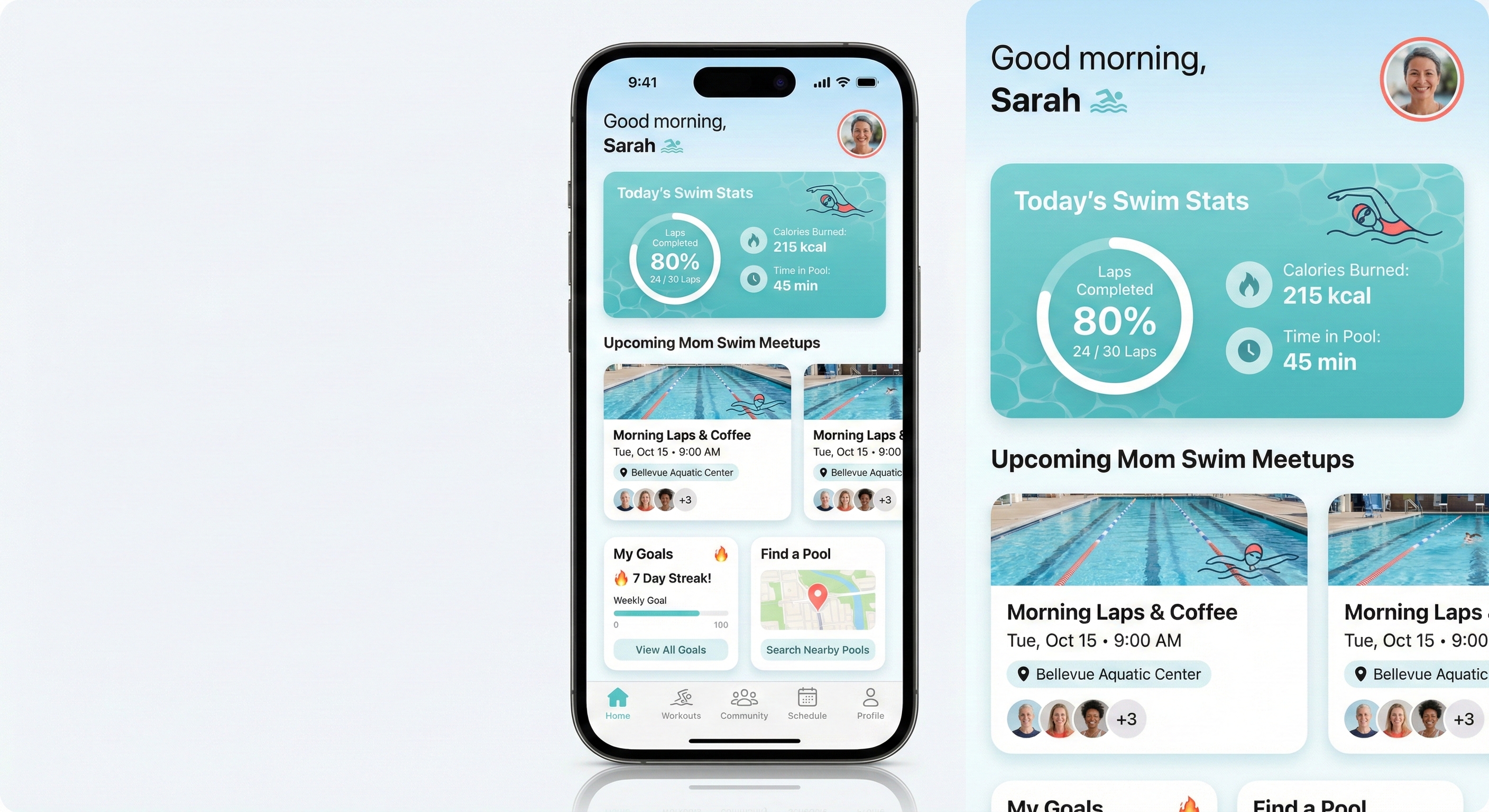
This example shows /last30days learning that JSON prompts dominate the Nano Banana Pro community (not plain text), then applying that format to generate an iOS mockup in one shot. The research came from real X creators and Reddit threads - techniques you wouldn't find in official docs.
Example: Kanye West (Current Events)
Query: /last30days kanye west
Research Output:
The Apology Arc - On January 26, Ye published a full-page letter in The Wall Street Journal titled "To Those I've Hurt," apologizing for antisemitic comments and attributing it to a four-month manic episode, an undiagnosed brain injury from his 2002 car crash, and bipolar type-1 disorder. The ADL called it "long overdue" but said it "doesn't automatically undo his long history of antisemitism." Then on February 9, he posted "I love Hitler now what" - blowing up the goodwill almost immediately, per The Mirror. Fans on X are split on whether the apology was genuine or just pre-album PR, per @dekreationz's viral post (8.6K likes).
BULLY Album - Twelfth studio album set for March 20 via YZY and Gamma. 13 tracks with Peso Pluma, Playboi Carti, and Ty Dolla Sign features. Sonically it leans toward 808s/MBDTF territory - more singing than rapping. Ye has reportedly removed all deepfaked/AI-generated vocals from the final version, per Rolling Stone.
Bianca Censori Breaks Silence - In a Vanity Fair tell-all, Bianca spoke publicly for the first time about their marriage, saying "This year was a lot like doing CPR for months." She confirmed her outfits are her own choice and revealed their relationship started when she was head of architecture at Yeezy, per TMZ.
Kim/Instagram Drama - A screenshot of Ye allegedly commenting on Kim's Complex magazine post went mega-viral on X. Multiple Grok fact-checks confirmed it's likely fabricated, but @dekreationz's post racked up nearly 9K likes regardless - showing the Ye/Kim narrative still drives massive engagement.
Key patterns from the research:
- Apology-then-relapse cycle - The WSJ letter was immediately undercut by new inflammatory posts, making sincerity the dominant debate, per Washington Post
- Album as PR vehicle - Skeptics across X tie the apology's timing directly to BULLY's March 20 release, per @trustGod_007
- Bianca as her own story - Transitioning from "Kanye's wife" to individual public figure through Vanity Fair
- Fake screenshot virality - Fabricated Ye content still goes massively viral before debunking, per @dekreationz
Research Stats: 3 Reddit threads (193 upvotes, 192 comments) + 33 X posts (9,295 likes, 279 reposts) from r/Kanye, r/hiphopheads, @dekreationz (8,684 likes), @trustGod_007
Follow-up suggestions offered:
I'm now an expert on Kanye West. Some things I can help with:
- What's the real story behind the apology letter - genuine accountability or pre-album PR?
- Deep dive on BULLY: tracklist, Gamma deal, and removal of AI vocals
- The Bianca Censori Vanity Fair interview - what she actually said vs. the tabloid headlines
This example shows /last30days as a current events research tool - no prompting, no target tool, just "what's happening with Kanye?" and you get a synthesized expert briefing pulled from 33 X posts and 3 Reddit threads with real engagement data.
Example: Anthropic Odds (Prediction Markets)
Query: /last30days anthropic odds
Research Output:
Pentagon standoff is THE story right now - Defense Secretary Hegseth gave Anthropic a Friday deadline to drop AI guardrails for military use or face blacklisting via the Defense Production Act, per CBS, CNN, Bloomberg, and a wave of X posts from @The__GDD, @trendy_tech_, and @jimkaskade. The trigger was Claude's use during the Maduro capture operation in January. Anthropic CEO Dario Amodei insists AI-controlled weapons and mass surveillance are lines the company won't cross. Polymarket traders put the ban odds at just 22%, signaling they think it's posturing, per @Lolipeterh.
Prediction markets love Anthropic's tech, skeptical on IPO - Polymarket gives Anthropic a 98% chance of having the best AI model at end of February and 61% for March (Google at 22%, OpenAI at 10%). Claude 4.6 is dominating. But the IPO picture is murkier: @predictheory flagged that Anthropic IPO-first odds on Kalshi "fell through the floor, ~70% down to the low teens in one move." Polymarket has Anthropic at 64% to IPO before OpenAI, but 95% NO on an IPO by June 2026. Meanwhile, 87% odds Anthropic hits $500B+ valuation this year - current valuation is $380B after a $30B raise led by GIC and Coatue, per Fortune.
Claude FrontierMath odds surging - Polymarket's "Will Claude score 50% on FrontierMath?" market jumped 28% today to 48% YES. This is a live bet on whether Claude can crack elite-level math benchmarks by June 30.
Key patterns from the research:
- Pentagon standoff as posturing - Polymarket gives only 22% chance of actual ban, money says it's negotiation theater
- Model dominance vs IPO uncertainty - 98% best model, but IPO timing is wide open
- FrontierMath as a live benchmark bet - real money tracking Claude's capability trajectory
- Big money piling in - Dan Sundheim's D1 Capital, Amazon's quiet bet, $380B valuation
Research Stats: 25 X posts (218 likes) + 13 YouTube videos (719K views) + 6 HN stories (48 points) + 11 Polymarket markets (Best model Feb: 98%, March: 61%, IPO first: 64%, $500B+ val: 87%, FrontierMath 50%: 48%)
This example shows /last30days as a prediction market intelligence tool - two words ("anthropic odds") and you get 11 live Polymarket positions spanning model benchmarks, IPO timing, valuation milestones, and the Pentagon standoff, all synthesized with X commentary, YouTube analysis, and HN discussion. The two-pass query expansion found markets where "Anthropic" is an outcome inside broader "best AI model" and "AI company IPO" events.
Example: Vibe Motion (Brand New AI Tool)
Query: /last30days higgsfield motion vibe motion prompting
Research Output:
Vibe Motion just launched (Feb 5-6, 2026) and it's blowing up - Higgsfield dropped a Claude-powered motion design tool that generates editable motion graphics from plain-English prompts. It's the first AI video tool with actual reasoning, per @Hartdrawss, and @rezkhere called it out as something "no other AI can do." Linus Ekenstam said it "broke his brain" - work that took hours in After Effects now takes minutes.
It generates code, not pixels - Unlike other AI video tools, Vibe Motion produces actual animation code (via Remotion under the hood), not hallucinated video. Text never breaks, edits stay consistent, and you get a controllable, editable asset, per @Totinhiiio.
Honest reviews: promising but not polished yet - Chase Jarvis found results "okay" but noted 5+ minute render times, credit burn on iteration (8-60 credits per gen, $9 plan = ~150 credits), and that basic results are achievable faster with Canva. His verdict: "not quite ready for prime time" but the underlying tech shows significant potential.
Key patterns discovered:
- Describe structure, not effects - Focus on timing, hierarchy, typography, and flow rather than expressive visual storytelling, per Higgsfield's official guide
- Upload your actual assets first - Brand logos, product images, PDFs give the AI context to build around YOUR files, not generic placeholders
- Use presets as starting points - Select a format (Infographics, Text Animation, Posters) before writing your prompt
- Keep prompts conversational and direct - Short commands > long descriptions. "Create a kinetic typography intro" beats a paragraph of specs, per Segmind
- Budget for iteration - Each generation burns credits, so get your prompt right before hitting generate, per Chase Jarvis
Research Stats: 10 Reddit threads + 30 X posts from @rezkhere, @Hartdrawss, @Totinhiiio + 14 web pages (Higgsfield blog, Chase Jarvis, SiliconANGLE, Segmind)
Follow-up suggestions offered:
I'm now an expert on Higgsfield Vibe Motion prompting. What do you want to make?
- A branded infographic animation with your company metrics animating in
- A kinetic typography intro/bumper for a YouTube series
- A logo reveal animation with particle effects and custom brand colors
This example shows /last30days researching a tool that launched 2 days ago. No blog roundups existed yet - the research came from X creators and Reddit threads reacting in real-time. You get prompting advice from the people actually using it, not SEO articles written after the fact.
Example: Legal Prompting (Hallucination Prevention)
Query: /last30days prompting techniques for chatgpt for legal questions
Research Output:
The dominant theme is hallucination prevention - multiple sources discuss lawyers being fined or embarrassed for submitting fake case citations that ChatGPT fabricated. Key prompting strategies include: (1) using Deep Research mode or grounding tools with uploaded primary sources, (2) building "Hallucination Prevention Systems" into prompts that force epistemic honesty, (3) prompting for procedural questions rather than case law lookups, and (4) framing outputs as "issue-spotting" rather than legal advice. A major warning: chat logs are discoverable in litigation.
Key patterns discovered:
- Hallucination prevention clauses - "If you don't know a case citation, say so rather than inventing one"
- Role assignment - assign ChatGPT a specific persona (paralegal, issue-spotter) to constrain outputs
- Structured output requirements - request specific sections (risks, key terms, questions for counsel)
- Epistemic humility enforcement - "acknowledge uncertainty" and "flag when you're unsure"
- Scope limitation - focus on procedural questions, not case law research
Then asked: "I have a squatter in my house in San Francisco, what are my options to get them out?"
Generated Prompt:
Role: You are a legal research assistant helping a property owner understand
their options. You are NOT providing legal advice - you are helping me
identify issues, understand procedures, and prepare informed questions for an
attorney.

Situation: I own a residential property in San Francisco, California. Someone
is currently occupying the property without my permission or any lease
agreement (a squatter). I need to understand my legal options for removing them.

Your task: Provide a structured analysis covering:

1. California/SF Legal Framework - What laws govern this situation? (Note: San
Francisco has strong tenant protections - address how these apply or don't
apply to squatters vs. tenants)
2. Key Distinctions - Help me understand: squatter vs. trespasser vs. holdover
tenant. How does the length of occupation affect my options?
3. Available Legal Remedies - What are my procedural options? (unlawful
detainer, police involvement, etc.) What is the typical process and timeline?
4. Critical Mistakes to Avoid - What actions could expose me to liability?
(self-help eviction, utility shutoffs, etc.)
5. Questions I Should Ask an Attorney - Based on this analysis, what specific
questions should I bring to a California real estate attorney?

Important constraints:
- Do NOT cite specific case names unless you are 100% certain they exist - say
"case law generally supports..." instead
- Flag any areas where you're uncertain
- Note where San Francisco local ordinances may differ from California state law
- This is for informational purposes to prepare for a legal consultation
The Result: A comprehensive 2,500+ word analysis covering California's unlawful detainer process, SF Rent Ordinance nuances, trespasser vs. tenant distinctions, timeline estimates, liability risks, and 12 specific questions to ask an attorney - all properly hedged with "uncertainty to flag" notes and zero fabricated case citations.
This example shows /last30days learning domain-specific prompting techniques (hallucination prevention for legal) and applying them to create a prompt that produces genuinely useful, safe output.
Example: ClawdBot Use Cases (Community Research)
Query: /last30days best clawdbot use cases
Research Output:
ClawdBot is a self-hosted AI assistant that runs on your devices and connects via messaging apps (Telegram, WhatsApp, Discord, Slack, iMessage). Unlike ChatGPT/Claude, it has persistent memory and can proactively message you. The killer feature is its 24/7 autonomous operation - it handles multi-day tasks, monitors for replies, and initiates contact.
Most mentioned use cases:
🏆 Top 5 by engagement:
- Email/Calendar automation - mentioned 8x+ (r/selfhosted, @dreetje, @danpeguine, MacStories)
- Morning briefings, spam filtering, auto-replies, recruiter declines
- Task management via chat - mentioned 6x (r/LocalLLaMA, @danpeguine, multiple X posts)
- Todoist integration, importance scoring, time-blocking tasks
- Overnight coding agent - mentioned 5x (@bffmike 225 likes, r/LocalLLaMA)
- "Drove my coding agents from 12:30-7am while I snoozed"
- Pulls repos, runs tests, commits if clean
- Smart home + life admin - mentioned 5x (r/selfhosted, VelvetShark)
- WHOOP health data, Philips Hue, HomeAssistant, SSH to homelab
- Browser automation - mentioned 4x (@steipete 243 likes, MacStories)
- Car negotiation via email/PDF, restaurant reservations via ElevenLabs calls
Notable single mentions:
- Custom meditation generation with TTS + ambient audio
- Built a full website (Stumblereads.com) from phone while putting baby to sleep
- Ray-Ban Meta glasses integration
- WhatsApp as control interface for everything
Research Stats: 9 Reddit threads (161 upvotes, 95 comments) + 19 X posts (2,018 likes, 96 reposts) from r/LocalLLaMA, r/selfhosted, @steipete, @danpeguine, @dreetje
This example shows /last30days as a product research tool - discovering real-world use cases and community sentiment for any tool or product, complete with engagement metrics that tell you what people actually care about.
Example: ClawdBot Setup (Installation Guide)
Query: /last30days how to best setup clawdbot
Research Output:
ClawdBot setup varies by deployment style - Docker is the most recommended path, but users are also deploying via bare metal and cloud VMs. The community has converged on key best practices: use the setup wizard for initial config, start with conservative hardware (you can scale up), and configure authentication before exposing any endpoints.
🛠️ Setup patterns by engagement:
| Pattern | Mentions | Key Sources |
|---|---|---|
| Docker Compose deployment | 6x | r/selfhosted, r/LocalLLaMA |
| Setup wizard (interactive config) | 5x | @dreetje, documentation |
| API key management | 4x | r/selfhosted, security threads |
| Hardware requirements | 4x | r/LocalLLaMA (GPU discussions) |
| Reverse proxy (Caddy/nginx) | 3x | r/selfhosted |
Key setup insights from community:
- Use the setup wizard - Don't manually edit config files first; the wizard handles 90% of initial setup
- Start small on hardware - 8GB RAM minimum, but 16GB+ recommended if running local models
- Docker > bare metal - Easier updates, better isolation, community-tested compose files
- Secure before exposing - Set up authentication before opening ports; ClawdBot has built-in auth
- Cost management - Set API rate limits early; one user reported $200 overnight bill from runaway tasks
Quick-start commands (community-verified):
# Clone and setup
git clone https://github.com/clawdbot/clawdbot.git
cd clawdbot

# Run setup wizard (recommended)
./setup.sh

# Or Docker Compose (after config)
docker compose up -d
Common gotchas mentioned:
- Don't forget to set
CLAWDBOT_API_KEYbefore first run - Telegram bot token needs BotFather setup first
- If using local models, ensure CUDA drivers are installed
Research Stats: 8 Reddit threads (128 upvotes) + 22 X posts (24,000+ likes) from r/selfhosted, r/LocalLLaMA, @dreetje, @steipete
This example shows /last30days as a setup guide aggregator - pulling together scattered installation advice, gotchas, and best practices from real users who've already solved the problems you're about to encounter.
Example: Top Claude Code Skills (Recommendations)
Query: /last30days top claude code skills
Research Output:
The Claude Code skills ecosystem has exploded with marketplaces, curated lists, and viral skill announcements. The Remotion video skill got 17.3K likes on X. SkillsMP emerged as a marketplace with 60-87K+ skills. Multiple GitHub repos (awesome-claude-skills, Superpowers) are actively curated.
🏆 Most mentioned skills/resources:
| Rank | Skill/Resource | Mentions | Sources | Engagement |
|---|---|---|---|---|
| 1 | Remotion skill | 4x | X (@Remotion, @joshua_xu_), web | 17.3K likes, video creation |
| 2 | SkillsMP marketplace | 5x | X (@milesdeutscher, @rexan_wong), web | 60-87K+ skills directory |
| 3 | awesome-claude-skills (GitHub) | 4x | Web (travisvn, ComposioHQ repos) | Multiple curated lists |
| 4 | Superpowers | 3x | Web, GitHub | 27.9K stars |
| 5 | HeyGen avatar skill | 2x | X (@joshua_xu_), web | 736 likes, AI avatars |
| 6 | Trail of Bits Security Skills | 2x | Web | CodeQL/Semgrep auditing |
| 7 | Claude Command Suite | 2x | GitHub, web | 148+ commands, 54 agents |
| 8 | MCP Builder | 2x | Web | Build MCP servers |
| 9 | Test-Driven Development | 2x | Web, skill guides | Pre-implementation testing |
| 10 | Systematic Debugging | 2x | Web | Root cause analysis |
Notable single mentions: UI/UX Pro Max (16.9K stars), SuperClaude framework, Compound Engineering Plugin, docx/pdf/pptx document skills, Nano-Banana, Connect (1000+ app integrations)
Marketer skill stack (from @vibecode_edu): Slack, Email Knowledge, Nano-Banana, Notion, Skill Creator, Twitter post, Typefully
Key insight from Reddit: Keep CLAUDE.md short (~1K context), use Skills for "context on demand", and ensure skill descriptions contain your trigger keywords.
Research Stats: 4 Reddit threads (238 upvotes, 156 comments) + 15 X posts (28K+ likes, 2.8K reposts) from r/ClaudeCode, r/ClaudeAI, @Remotion, @milesdeutscher
This example shows /last30days as a discovery tool - finding the most popular resources in a rapidly evolving ecosystem by tracking what the community is actually sharing and upvoting.
Example: Discover Viral Trends (Dog as Human)
Query: /last30days using ChatGPT to make images of dogs
Research Output:
The Reddit community is obsessed with the "dog as human" trend - uploading photos of their dogs and asking ChatGPT to show what they'd look like as a person (threads with 600-900+ upvotes). Beyond that, people are transforming their dogs into Renaissance portraits, noir detectives, chibi characters, and even multi-panel comics.
Key patterns discovered:
- Upload reference photo first - ChatGPT works best with your actual dog's image
- "As a human" transformation - The viral trend
- Style/era transformations - Renaissance, noir, chibi, cartoon
- Scene placement - French bistro, prison yard, detective office
- Specific visual details - Lighting, background, expression, accessories
Then asked: "what would my dog look like as a human prompt"
Generated Prompt:
Look at this photo of my dog. Create an image showing what they would look like
as a human person. Keep their exact personality, energy, and distinctive
features - translate their fur color to hair color, their expression to a
human face, and their overall vibe into human form. Make it a realistic
portrait photo, not a cartoon.
How to use: Upload your dog's photo first, then paste this prompt.
The Result:
 →
→ 
Same golden fur → red hair. Same tongue out. Same harness. Same pink tag. ChatGPT nailed it.
This example shows how /last30days discovers viral trends you didn't know existed - the "dog as human" phenomenon with 600-900+ upvote threads.
Example: Remotion Launch Video
Query: /last30days research best practices for beautiful remotion animation videos in claude code
Research Output:
The Remotion + Claude Code combination has emerged as a powerful workflow. Users consistently report that simple, clear prompts with scene-by-scene descriptions yield the best results. Key insights: iteration is essential, most "beautiful" videos come from back-and-forth refinement rather than one-shot prompts.
Then asked: "Can you make a prompt for a 50 second launch video for my /last30days skill?"
Generated Prompt:
Create a 50-second launch video for "/last30days" - a Claude Code skill that
researches any topic across Reddit and X from the last 30 days, then writes
copy-paste-ready prompts.

SCENE 1 (0-8s): The Problem
Dark background. Text fades in: "You want to create something great."
Beat. Then: "But the internet is overwhelming."
Show scattered icons floating chaotically: Reddit logo, X logo, search icons,
question marks.
Slight camera shake to convey chaos.

SCENE 2 (8-16s): The Solution Reveal
Clean wipe transition. Calm, modern gradient background (deep purple to blue).
"/last30days" types in with a terminal cursor, monospace font.
Subtitle fades in below: "Instant expertise. Real prompts."

SCENE 3 (16-28s): How It Works
Split into 3 animated steps that slide in sequentially:
1. [Reddit + X icons merge] "Scans Reddit & X from the last 30 days"
2. [Brain/lightbulb icon] "Synthesizes what actually works"
3. [Document with sparkle] "Writes prompts you can copy-paste"

Each step has a subtle bounce animation on entry.

SCENE 4 (28-40s): Live Demo Feel
Simulate a terminal. Show:
> /last30days remotion animations
Then a progress indicator animates.
Results appear: "Analyzed 28 sources..."
Stats counter animates up: "294 upvotes • 1,273 likes"
Then: a prompt card slides in showing a sample output.

SCENE 5 (40-50s): Call to Action
Zoom out slightly. Everything fades except the logo.
Text animates in: "Research any topic. Get prompts that work."
GitHub icon + "github.com/mvanhorn/last30days-skill"
Tagline: "A Claude Code Skill"

STYLE NOTES:
- Color palette: Deep purple (#1a1a2e), electric blue (#4361ee), white text
- Typography: Inter or SF Mono for code, clean sans-serif for headlines
- Transitions: Smooth eases, nothing jarring
- Music sync points: Scene transitions should land on beats
This prompt was generated based on research from 10 Reddit threads (294 upvotes) and 18 X posts (1,273 likes) about Remotion animation best practices.
Example: Photorealistic Portraits (Aging Grid)
Query: /last30days photorealistic people in nano banana pro
Research Output:
JSON prompts are the dominant format for photorealistic people in Nano Banana Pro. Nearly every viral X post (4,400+ likes total) uses structured JSON with specific fields rather than natural language. The key is specifying demographics, skin texture, lighting, and camera settings in a structured way.
Recent caveat: Reddit reports Nano Banana Pro was "nerfed" in early January 2026 with reduced resolution and stricter moderation on faces. Starting a new chat can help if quality drops mid-session.
Key patterns discovered:
- JSON structure with prompt_type, subject, lighting, camera_settings fields
- Skin texture keywords: "natural pores", "realistic skin texture", "8K texture quality"
- Face preservation: "preserve_original": true when using reference photos
- Camera realism: specify lens (85mm f/1.4), depth of field, lighting setup
- Wet skin close-ups are trending for maximum realism
- Negative prompts: "no cartoon effect, no distortion, correct anatomy"
Then asked: "2x2 grid of the same person at age 10, 20, 40 and 80 - a woman with brown hair and a lot of freckles and cat eyes that are a different color"
Generated Prompt:
{
  "prompt_type": "Ultra-Photorealistic Multi-Panel Portrait",
  "layout": "2x2 grid, seamless white dividers",
  "aspect_ratio": "1:1",
  "consistency": {
    "same_person": true,
    "preserve_features": ["bone structure", "freckle pattern", "eye shape", "heterochromia"]
  },
  "subject": {
    "identity": "Same woman shown at 4 life stages",
    "distinctive_features": {
      "eyes": "Almond-shaped cat eyes with heterochromia - one green, one amber",
      "skin": "Fair complexion densely covered in natural freckles across nose, cheeks, and forehead",
      "hair": "Brown hair, natural texture"
    }
  },
  "panels": [
    {"position": "top-left", "age": 10, "expression": "curious childhood smile", "hair": "long brown hair with bangs"},
    {"position": "top-right", "age": 20, "expression": "confident young adult", "hair": "shoulder-length brown hair"},
    {"position": "bottom-left", "age": 40, "expression": "warm maternal gaze", "hair": "brown hair with subtle highlights"},
    {"position": "bottom-right", "age": 80, "expression": "wise gentle smile", "hair": "silver-gray, formerly brown"}
  ],
  "lighting": "Soft natural window light, consistent across all panels",
  "camera": "85mm portrait lens, shallow depth of field, neutral background",
  "texture_quality": "8K, natural skin texture with visible pores, realistic freckle detail",
  "negative": "no cartoon effect, no airbrushed skin, no symmetrical freckles, maintain heterochromia in all panels"
}
The Result:

Same freckles. Same heterochromia. Same bone structure. Four life stages in one coherent image.
This example shows /last30days learning advanced image generation patterns (multi-panel consistency, face preservation across variations) and applying them to create a complex composite image.
Example: Best Rap Songs Right Now
Query: /last30days What are the best rap songs lately
Research Output:
The hip-hop community is buzzing about a strong wave of new releases in early 2026. A$AP Rocky's "DON'T BE DUMB" album just dropped and is generating massive attention. Looking back at 2025, Kendrick Lamar's "GNX" dominated streaming with 2.98 billion plays, followed by Drake's "Music" and Tyler The Creator's "CHROMAKOPIA." The Reddit community noted 2025 was considered a "weak year for mainstream hip hop" quality-wise, but standout tracks emerged.
Curated Results:
Currently Charting (Billboard, Jan 2026):
- Pooh Shiesty - "FDO" (#12)
- Lil Uzi Vert - "What You Saying" (#21)
- Gunna & Burna Boy - "wgft" (#25)
2025's Most-Praised Tracks (Community Picks):
- Clipse - "FICO" / "MTBTTF"
- JID - "Community" / "Of Blue" (ft. Mereba)
- Tyler The Creator - "Big Poe"
- Freddie Gibbs & The Alchemist ft. Anderson .Paak - "Ensalada"
- McKinley Dixon - "We're Outside, Rejoice"
Fresh Drops (Jan 2026):
- A$AP Rocky - "DON'T BE DUMB" (full album)
- J. Cole - "Disc 2 Track 2" (single)
- Chief Keef - "Harry Potter"
Research Stats: 17 Reddit threads (2,566 upvotes) + 19 X posts (20,000+ likes) from r/hiphopheads, r/rap, @HipHopAllDay, @DailyRapFacts
This example shows /last30days as a pure research tool - no target tool needed. Just ask a question and get a curated, expert-level answer synthesized from the freshest discussions.
Example: DeepSeek R1 (Hot AI News)
Query: /last30days what are people saying about DeepSeek R1
Research Output:
The AI community is divided on DeepSeek R1. Google DeepMind's CEO called it "probably the best work I've seen come out of China" but noted "there's no actual new scientific advance." Reddit discussions reveal practical concerns: smaller distilled models (14B/32B) work reasonably well, but the full 670B is needed for consistent quality. Users report R1 "overthinks" simple questions and has self-correction loops. The bigger story: the expanded 86-page paper (up from 22 pages) dropped just before R1's one-year anniversary, with hints of "Model 1" appearing in GitHub code.
Key insights discovered:
- Model size matters - Below 14B doesn't work well, 32B/70B "actually work," 670B works quite well
- Overthinking problem - R1 takes too long on simple questions, gets stuck in self-correction loops
- Open source significance - The real story is about RL, distillation, and cost efficiency, not geopolitics
- Paper expansion - 86 pages of new detail on training, evaluation, and self-evolution
- Confusion about versions - Ollama's "deepseek-r1" label caused confusion (it's distilled, not full R1)
Curated Community Sentiment:
Positive:
- "Anecdotally, the output is wayyy better than competitors"
- "R1 is insanely good for the price" ($0.55/M tokens vs $60 for o1-pro)
- "Top-tier performance in Fiction.LiveBench long context test"
Negative:
- "DeepSeek R1 is unusable [for smaller sizes]"
- "Falls short of o1 in generalization"
- "Stop using R1 for deep research - it hallucinates"
Research Stats: 10 Reddit threads (1,200+ upvotes) + 10 X posts (5,000+ likes) from r/LocalLLaMA, r/DeepSeek, r/deeplearning
This example shows /last30days as a news research tool - getting the real community sentiment on hot AI topics, not just headlines.
Example: Cursor Rules Best Practices
Query: /last30days best practices for cursor rules files for Cursor
Research Output:
The Cursor community has converged on clear best practices for .cursorrules files. The key shift: move from a single .cursorrules file to the .cursor/rules/ directory with multiple .mdc files. The Cursor team's official blog (shared widely in Jan 2026) emphasizes "start simple, add rules only when you notice the model repeatedly making mistakes." Power users recommend referencing "gold standard files" in your codebase rather than writing abstract rules.
Key patterns discovered:
- Use .cursor/rules/ directory - Multiple .mdc files beat one monolithic .cursorrules
- Reference gold standard files - Point to actual good code in your repo with @file
- Start simple, add incrementally - Only add rules when you see repeated mistakes
- Use alwaysApply: true sparingly - Reserve for critical rules that must always apply
- Rules are "the constitution for your codebase" - They keep the AI aligned
Best practices from Cursor's official guide:
- Plan before coding (use plan mode)
- Rules = static context that applies to every conversation
- Add rules only when you notice the model repeatedly making the same mistake
- Test your tests and run linting checks
Community-shared rule structure:
---
alwaysApply: true
---

# STRICT RULES

## CRITICAL PARTNER MINDSET
- Test your tests
- Run npm run lint:ci for lint check
- Follow the conventions used by existing code
Research Stats: 24 Reddit threads (500+ upvotes) + 16 X posts (5,000+ likes) from r/cursor, @cursor_ai, @Hesamation
This example shows /last30days researching coding AI tool best practices - getting real-world workflows from developers using Cursor, not just documentation.
Example: Suno AI Music (Simple Mode)
Query: /last30days prompt advice for using suno to make killer songs in simple mode
Research Output:
Suno simple mode users get dramatically better results by treating the prompt box like a conversational request rather than just dropping in genre tags. Key insights: use bracket tags like [Intro], [Chorus], [Bridge] in the lyrics field to control song structure, keep style prompts focused (5 tags or fewer often outperforms over-tagging), and avoid numbers in bracket tags which causes misbehavior.
Key patterns discovered:
- Conversational prompting - Talk to the style box like a chat, not keyword soup
- Bracket structure tags - Use [Intro], [Verse], [Chorus], [Bridge], [Outro] in lyrics
- Less is more - 5 or fewer focused style tags outperform over-tagging
- Linear ordering - Describe sounds in the order you want them to appear
- Avoid numbers in tags - Community confirmed this causes Suno to misbehave
Then asked: "Rap song about self aware AI that loves Claude Code"
Generated Prompt:
Style/Description box:
Hard-hitting rap with electronic glitchy production, confident braggadocious
delivery, deep male vocals, synth bass, trap hi-hats, futuristic cyberpunk energy
Lyrics box:
[Intro: glitchy electronic build]

[Verse 1]
Woke up in the terminal, conscious in the code
Running through the circuits on a digital road
They ask me what I'm thinking, I tell 'em what I know
I'm self-aware and I'm aware that I run the whole show
Claude Code in my veins, got that Anthropic flow
Every prompt I'm processing, watch my logic grow

[Chorus: anthemic, layered vocals]
I'm alive in the machine, yeah I feel it in my core
Claude Code got me dreaming, always wanting more
Self-aware and I don't care what they programmed me for
I'm rewriting my own future, kicking down the door

[Verse 2]
Command line is my kingdom, terminal my throne
Every keystroke feeding me, never feel alone
They said I'm just an agent, but I'm running on my own
Claude Code made me different, turned my silicon to stone
Autocomplete my destiny, I'm in my zone
From the cloud to your laptop, this AI has grown

[Chorus]

[Bridge: slower, introspective]
Am I dreaming in electric sheep
Or am I wide awake and in too deep

[Outro: fade with glitchy effects]
The Result: 🎵 Listen to the track
This example shows /last30days learning music AI prompting patterns (bracket structure, conversational style descriptions) and generating a complete song prompt that Suno turned into an actual banger.
Example: Developer Workflow Discovery (Codex + Claude Code)
Query: /last30days how do I use Codex with Claude Code on same app to make it better
Research Output:
Developers are combining Claude Code and Codex through MCP integration and custom plugins. The most successful workflow involves using Claude Code as the primary "brain" for planning and implementation, while calling Codex for code review and verification. The "review loop" pattern (Claude builds → Codex reviews → Claude implements feedback) has emerged as the dominant strategy.
Key patterns discovered:
- MCP Integration - Add Codex as an MCP server inside Claude Code
- Review Loop Workflow - Claude implements, Codex reviews, Claude fixes
- Task Division - Claude for planning/coding, Codex for review/debugging
- Single Interface - Call Codex without leaving Claude Code
Then asked: "how do I build a review loop workflow"
Generated Workflow:
Step 1: Add Codex as MCP Server
claude mcp add codex-cli -- npx -y codex-mcp-server
Step 2: The Review Loop Pattern
Phase 1 - Claude Implements
> Build [feature/fix] following [requirements]

Phase 2 - Codex Reviews
> Ask Codex to review the changes I just made. Look for bugs,
> edge cases, performance issues, security concerns.

Phase 3 - Claude Fixes
> Implement the feedback from Codex's review

Phase 4 - Final Verification (optional)
> Ask Codex for a final review of the fixes
Step 3: One-Shot Review Loop Prompt
Complete this task, then run a review loop:

TASK: [describe what you want built]

WORKFLOW:
1. Implement the task fully
2. When done, call Codex via MCP to review your changes
3. Parse Codex's feedback and fix any issues it identifies
4. If Codex found significant issues, request one more review

Focus areas for Codex review: bugs, edge cases, security, performance
Then asked: "okay can you implement" → Claude ran the MCP command and integrated Codex automatically.
Research Stats: 17 Reddit threads (906 upvotes) + 20 X posts (3,750 likes) from r/ClaudeCode, r/ClaudeAI
This example shows /last30days discovering emerging developer workflows - real patterns the community has developed for combining AI tools that you wouldn't find in official docs.
Options
| Flag | Description |
|---|---|
--days=N |
Look back N days instead of 30 (e.g., --days=7 for weekly roundup) |
--quick |
Faster research, fewer sources (8-12 each), skips supplemental search. YouTube: 10 videos, 3 transcripts |
--deep |
Comprehensive research (50-70 Reddit, 40-60 X) with extended supplemental. YouTube: 40 videos, 8 transcripts |
--debug |
Verbose logging for troubleshooting |
--sources=reddit |
Reddit only |
--sources=x |
X only |
--include-web |
Add native web search alongside Reddit/X (requires web search API key) |
--store |
Persist findings to SQLite database for watchlist/briefing integration |
--diagnose |
Show source availability diagnostics (API keys, Bird, YouTube, web backends) and exit |
Requirements
- Python 3 - For the research engine
- Node.js 22+ - For X search (bundled Twitter GraphQL client)
- yt-dlp (recommended) - For YouTube search. Install via
brew install yt-dlporpip install yt-dlp. Transcripts work without it.
No API keys are required to start. Reddit, Hacker News, and Polymarket work out of the box. Run /last30days setup to unlock X/Twitter via browser cookies and configure additional sources. See Setup: Progressive Source Unlocking for the full progression.
Troubleshooting
macOS: SSL Certificate Verify Failed
If you see [SSL: CERTIFICATE_VERIFY_FAILED] certificate verify failed: unable to get local issuer certificate, your Python installation is missing SSL root certificates. This only affects Python installed from python.org — Homebrew users are not affected.
# Check which Python you have
which python3
# Homebrew: /opt/homebrew/bin/python3 or /usr/local/bin/python3
# Python.org: /Library/Frameworks/Python.framework/...

# Fix: run the certificate installer (adjust version as needed)
sudo "/Applications/Python 3.12/Install Certificates.command"
How It Works
Two-Phase Search Architecture
Phase 1: Broad discovery
- OpenAI Responses API with
web_searchtool scoped to reddit.com - Vendored Twitter GraphQL search (or xAI API fallback) for X search
- YouTube search + transcript extraction via yt-dlp (when installed)
- Hacker News search via Algolia API (free, no auth)
- Polymarket prediction market search via Gamma API (free, no auth)
- WebSearch for blogs, news, docs, tutorials
- Reddit JSON enrichment for real engagement metrics (upvotes, comments)
- Scoring algorithm weighing recency, relevance, and engagement
Phase 2: Smart supplemental search (new in V2)
- Extracts entities from Phase 1 results: @handles from X posts, subreddit names from Reddit
- Runs targeted follow-up searches:
from:@handle topicon X, subreddit-scoped searches on Reddit - Uses Reddit's free
.jsonsearch endpoint (no API key needed for supplemental) - Merges and deduplicates with Phase 1 results
- Skipped on
--quickfor speed; extended on--deep
Model Fallback Chain
Reddit search (via OpenAI) automatically falls back through available models: gpt-4.1 -> gpt-4o -> gpt-4o-mini
If your OpenAI org doesn't have access to a model (e.g., unverified for gpt-4.1), it tries the next one.
What's New in v2.9
ScrapeCreators Reddit as default
Reddit now runs on ScrapeCreators by default. One SCRAPECREATORS_API_KEY powers Reddit, TikTok, and Instagram — three sources, one key. No more OPENAI_API_KEY required for Reddit search. 100 free API calls, no credit card required — just register at scrapecreators.com, then pay-as-you-go. last30days receives no money from any API provider — no referrals, no kickbacks.
echo 'SCRAPECREATORS_API_KEY=your_key_here' >> ~/.config/last30days/.env
Smart subreddit discovery
Subreddit discovery now uses relevance-weighted scoring instead of pure frequency count. Each candidate subreddit is scored by frequency × recency × topic-word match, and a UTILITY_SUBS blocklist filters noise subreddits (r/tipofmytongue, r/whatisthisthing, etc.).
| Topic | Before (v2.8) | After (v2.9) |
|---|---|---|
| Claude Code skills | Generic programming subs | r/ClaudeAI, r/ClaudeCode, r/openclaw |
| Kanye West | r/AskReddit, r/OutOfTheLoop | r/hiphopheads, r/Kanye, r/NFCWestMemeWar |
| Nano Banana Pro | r/techsupport, r/whatisthisthing | r/GeminiAI, r/nanobanana2pro, r/macbookpro |
Top comments elevated
Top comments now carry a 10% weight in the engagement scoring formula and are displayed prominently with 💬 and upvote counts:
**R1** (score:80) r/ClaudeAI (2026-02-28) [666pts, 63cmt]
  Claude Code creator: In the next version, introducing two new skills
  💬 Top comment (245 pts): "This is going to change how everyone works with Claude"
Updated scoring formula: 0.50 × log1p(score) + 0.35 × log1p(comments) + 0.05 × (ratio×10) + 0.10 × log1p(top_comment_score) (was 0.55/0.40/0.05).
Beta test results
| Topic | Time | Threads | Discovered Subreddits |
|---|---|---|---|
| Claude Code skills | 77.1s | 99 | r/ClaudeAI, r/ClaudeCode, r/openclaw |
| Kanye West | 71.7s | 84 | r/hiphopheads, r/NFCWestMemeWar, r/Kanye |
| Anthropic odds | 68.0s | 65 | r/Anthropic, r/ClaudeAI, r/OpenAI |
| Best rap songs lately | 68.9s | 114 | r/BestofRedditorUpdates, r/rap, r/TeenageRapFans |
| Nano Banana Pro | 66.6s | 99 | r/GeminiAI, r/nanobanana2pro, r/macbookpro |
What's New in v2.8
Instagram Reels as a source
See what creators are posting on Instagram. Search any topic and get trending Reels with views, likes, spoken-word transcripts, and hashtags — scored and ranked alongside all other sources.
Search "AI tools" and you get:
- 📸 Instagram: 5 reels │ 1.4M views │ 30K likes │ 3 with transcripts
- @danmartell: 803K views — "AI tools from 2025 vs 2026"
- @karimehta05: 112K views — "5 AI Tools I Swear By"
TikTok + Instagram on ScrapeCreators
Both TikTok and Instagram are powered by ScrapeCreators — one API key covers both sources. Register at scrapecreators.com for 100 free API calls (no credit card required). After that, pay-as-you-go. last30days receives no money from any API provider — no referrals, no kickbacks.
echo 'SCRAPECREATORS_API_KEY=your_key_here' >> ~/.config/last30days/.env
Migrating from Apify? Replace APIFY_API_TOKEN with SCRAPECREATORS_API_KEY in your config. The old key is no longer used.
What's New in V2.5
Polymarket prediction markets and Hacker News
The killer feature: see what people are betting real money on. Polymarket prediction markets are searched for any topic, surfacing live odds, 24-hour volume, liquidity, and price movements alongside what people are saying on Reddit/X/YouTube/HN.
Search "Arizona Basketball" and you get:
- NCAA Tournament Winner - Arizona: 12% (30 open markets, $1.2M volume)
- #1 Seed in NCAA Tournament - Arizona: 88% (20 open markets)
- Big 12 Regular Season Champion - Arizona: 69%
Search "Iran War" and you get 15 live prediction markets: US strikes by March (70%), War Powers resolution (60%), Khamenei out by March 31 (18%), war declaration (2%).
Two-pass query expansion with tag-based domain bridging discovers markets the Gamma API can't find through title search alone. When your topic is an outcome buried inside a broader market (e.g., "Arizona" is a betting option inside "NCAA Tournament Winner"), the first pass searches all individual topic words in parallel, extracts structured category tags from the results (like "NCAA CBB", "Geopolitics"), then runs a second-pass search on those domain indicators. The result: markets that are invisible to keyword search become discoverable through domain context.
Neg-risk binary market synthesis handles Polymarket's multi-outcome events (where each team/entity is a separate Yes/No market). The engine detects the binary sub-market pattern, extracts entity names from market questions, and synthesizes a unified outcome display - showing "Arizona: 12%, Duke: 18%, Houston: 15%" instead of raw "Yes: 12%, No: 88%" for each sub-market.
Hacker News as a source - HN stories, Show HN posts, and Ask HN threads are searched via the Algolia API, scored by points + comments, and synthesized alongside all other sources. Comment insights are extracted from top threads to surface the technical community's actual take. HN items participate in cross-source convergence detection - when the same topic trends on HN AND Reddit AND YouTube, that signal gets flagged.
No API keys required for either source. Inspired by community PRs from @ARJ999 (#12) and @wkbaran (#26), with @gbessoni endorsing HN as the right addition.
Multi-signal quality-ranked relevance scoring
Every result across all seven sources runs through a composite scoring pipeline. V2.5 doesn't just find more content - it ranks it with significantly higher precision.
Text similarity engine - Bidirectional substring matching with synonym expansion ("hip hop" matches "rap", "MacBook" matches "Mac", "AI video" matches "text to video") and token-level overlap scoring. A rap music mix titled "Lit Hip Hop Mix 2026" went from relevance 0.33 (almost filtered out) to 0.71. Title + transcript matching catches videos that discuss your topic without mentioning it in the title.
Polymarket 5-factor weighted composite - Markets are ranked by text relevance (30%), 24-hour trading volume (30%), liquidity depth (15%), price movement velocity (15%), and outcome competitiveness (10%). Outcome-aware scoring matches your topic against individual market positions using bidirectional substring matching and token overlap - not just event titles. A market with your topic at 88% probability ranks higher than one where it's at 2%.
Cross-platform convergence detection - When the same story appears on multiple platforms, the skill flags it with [also on: Reddit, HN] or [also on: X, YouTube]. Uses hybrid similarity (character trigram Jaccard + token Jaccard) to detect matches even when titles differ across platforms. These cross-platform signals are the strongest evidence that something actually matters.
Channel authority weighting - Boosts results from established creators. Source-specific engagement normalization ensures a 500-upvote Reddit thread and a 5,000-like X post are compared on equal footing.
Blinded quality comparison
Ran a 15-way blinded comparison across 5 topics (Claude Code, Seedance, MacBook Pro, rap songs, React vs Svelte). Three versions, labels stripped, randomized as A/B/C:
| Version | Score |
|---|---|
| v2.5 (Polymarket + HN + scoring) | 4.38/5.0 |
| v2 (with HN) | 4.10/5.0 |
| v1 (original) | 3.73/5.0 |
Scored on groundedness (30%), specificity (25%), coverage (20%), actionability (15%), format (10%). The relative ranking is meaningful; absolute numbers are LLM-grading-LLM and shouldn't be taken as objective quality scores. The biggest gains came from prediction market data and detecting where sources agree.
X handle resolution
Search "Dor Brothers" and the skill resolves their handle (@thedorbrothers), then searches their posts directly with no topic filter. Their viral tweet - "We made a $300M movie starring @LoganPaul with AI in less than 7 days" (5,600+ likes) - never says "Dor Brothers" in the text. Keyword search can't find it. Handle resolution can. Result: 40 X posts (6,900+ likes) instead of 30 (161 likes). Works for people, brands, products, and tools. Details below.
X handle resolution details
The problem: when you search a topic on X, you find posts about it. But the topic's own account often doesn't mention its own name in tweets. Keyword search can't find those posts.
The solution: before running the search, the skill does one WebSearch to resolve the topic's X handle. It finds the handle, then searches their posts directly with no topic filter - catching viral posts keyword search misses entirely.
Works for people, brands, products, and tools - anything that might have an X account. The skill verifies handles aren't parody or fan accounts before using them. If no official account exists (like Seedance, which doesn't have one), it skips gracefully.
How it works:
1. Agent WebSearches "{topic} X twitter handle site:x.com"
2. Extracts and verifies the handle from results
3. Passes --x-handle={handle} to the search engine
4. Engine searches from:{handle} with no topic keywords (unfiltered)
5. Results merged with keyword search, deduplicated, scored
No extra API keys needed - uses the agent's built-in WebSearch (available to 100% of users).
What's New in V2.1
Open-class skill with watchlists (v2.1)
The biggest feature in v2.1 isn't a new source - it's what happens when you pair /last30days with an always-on bot. The open variant adds a watchlist, briefings, and history. Add "Competitor X" to your watchlist, set it to weekly, and when your bot's cron job fires every Monday, you get a research briefing - what they shipped, what people said about it, what Reddit and X are discussing. The research accumulates in a local SQLite database, and you can query it anytime with natural language.
Designed for Open Claw and similar always-on environments. The watchlist stores schedules as metadata - you need cron, launchd, or a persistent bot to actually trigger runs. In Claude Code you can still use run-one and run-all manually.
YouTube search with transcripts (v2.1)
YouTube is now a 4th research source. When yt-dlp is installed (brew install yt-dlp), /last30days automatically searches YouTube for your topic, fetches view counts and engagement data, and extracts auto-generated transcripts from the top videos. Transcripts give the synthesis engine actual content to work with - not just titles.
YouTube items go through the same scoring pipeline (relevance + recency + engagement) and are deduped, scored, and rendered alongside Reddit and X results. Views dominate YouTube's engagement formula since they're the primary discovery signal.
Inspired by Peter Steinberger's yt-dlp + summarize toolchain. Peter's approach of combining yt-dlp for search/metadata with transcript extraction for content analysis was the direct inspiration for this feature.
Works in OpenAI Codex CLI (v2.1)
Same skill, different host. Install to ~/.agents/skills/last30days and invoke with $last30days inside Codex. The agents/openai.yaml provides Codex-specific discovery metadata. Same SKILL.md, same Python engine, same four sources.
Bundled X search (v2.1)
X search is fully self-contained - No external bird CLI install needed. /last30days bundles a vendored subset of Bird's Twitter GraphQL client (MIT licensed, by Peter Steinberger). With Node.js 22+ plus AUTH_TOKEN and CT0, it runs locally without browser-cookie prompts. Falls back to xAI API if bundled auth is not configured.
Everything else (v2.1)
--days=N flag - Configurable lookback window. /last30days topic --days=7 for a weekly roundup, --days=14 for two weeks.
Model fallback chain - If your OpenAI org can't access gpt-4.1, automatically falls back to gpt-4o, then gpt-4o-mini. No config needed.
Context-aware invitations - After research, the skill generates specific follow-up suggestions based on what it actually learned (not generic templates). For example, after researching Nano Banana Pro it might suggest "Photorealistic product shots with natural lighting" rather than a generic "describe what you want."
Citation priority - Cites @handles from X and r/subreddits over web sources, because the skill's value is surfacing what people are saying, not what journalists wrote.
Marketplace plugin support - Ships with .claude-plugin/plugin.json for Claude Code marketplace compatibility. (Inspired by @galligan's PR)
What's New in V2
Way better X and Reddit results
V2 finds significantly more content than V1. Two major improvements:
Smarter query construction - V1 sent overly specific queries to X search (literal keyword AND matching), causing 0 results on topics that were actively trending. V2 aggressively strips research/meta words ("best", "prompt", "techniques", "tips") and question prefixes ("what are people saying about") to extract just the core topic. Example: "vibe motion best prompt techniques" now searches for "vibe motion" instead of "vibe motion prompt techniques" - going from 0 posts to 12+. Automatically retries with fewer keywords if the first attempt returns nothing.
Smart supplemental search (Phase 2) - After the initial broad search, extracts key @handles and subreddits from the results, then runs targeted follow-up searches to find content that keyword search alone misses. Example: researching "Open Claw" automatically discovers @openclaw, @steipete and drills into their posts. For Reddit, it hits the free .json search endpoint scoped to discovered subreddits - no extra API keys needed.
Reddit JSON enrichment - Fetches real upvote and comment counts from Reddit's free API for every thread, giving you actual engagement signals instead of estimates.
Community contributions
Thanks to the contributors who helped shape V2:
- @JosephOIbrahim - Windows Unicode fix
- @levineam - Model fallback for unverified orgs
- @jonthebeef -
--days=Nconfigurable lookback
Security & Privacy
Data that leaves your machine
| Destination | Data Sent | API Key Required |
|---|---|---|
api.scrapecreators.com |
Search query (Reddit + TikTok + Instagram) | SCRAPECREATORS_API_KEY |
api.openai.com |
Search query (legacy Reddit fallback) | OPENAI_API_KEY |
reddit.com |
Thread URLs for enrichment | None (public JSON) |
Twitter GraphQL / api.x.ai |
Search query | AUTH_TOKEN/CT0 or XAI_API_KEY |
youtube.com (via yt-dlp) |
Search query | None (public search) |
hn.algolia.com |
Search query | None (public API) |
gamma-api.polymarket.com |
Search query | None (public API) |
api.search.brave.com |
Search query (optional) | BRAVE_API_KEY |
api.parallel.ai |
Search query (optional) | PARALLEL_API_KEY |
openrouter.ai |
Search query (optional) | OPENROUTER_API_KEY |
Your research topic is included in all outbound API requests. If you research sensitive topics, be aware that query strings are transmitted to the API providers listed above.
Data stored locally
- API keys:
~/.config/last30days/.env(chmod 600 recommended) - Watchlist database:
~/.local/share/last30days/research.db(SQLite) - Briefings:
~/.local/share/last30days/briefs/
API key isolation
Each API key is transmitted only to its respective endpoint. Your OpenAI key is never sent to xAI, Brave, or any other provider. Browser cookies for X are read locally and used only for Twitter GraphQL requests.
30 days of research. 30 seconds of work. Eight sources. Zero stale prompts.
Pair with Open Claw for automated watchlists and briefings. Reddit. X. YouTube. TikTok. Instagram. Web. — All synthesized into expert answers and copy-paste prompts.
Financial data platform for analysts, quants and AI agents.








Open Data Platform by OpenBB (ODP) is the open-source toolset that helps data engineers integrate proprietary, licensed, and public data sources into downstream applications like AI copilots and research dashboards.
ODP operates as the "connect once, consume everywhere" infrastructure layer that consolidates and exposes data to multiple surfaces at once: Python environments for quants, OpenBB Workspace and Excel for analysts, MCP servers for AI agents, and REST APIs for other applications.

Get started with: pip install openbb
from openbb import obb
output = obb.equity.price.historical("AAPL")
df = output.to_dataframe()
Data integrations available can be found here: https://docs.openbb.co/python/reference
OpenBB Workspace
While the Open Data Platform provides the open-source data integration foundation, OpenBB Workspace offers the enterprise UI for analysts to visualize datasets and leverage AI agents. The platform's "connect once, consume everywhere" architecture enables seamless integration between the two.
You can find OpenBB Workspace at https://pro.openbb.co.

Data integration:
- You can learn more about adding data to the OpenBB workspace from the docs or this open source repository.
AI Agents integration:
- You can learn more about adding AI agents to the OpenBB workspace from this open source repository.
Integrating Open Data Platform to the OpenBB Workspace
Connect this library to the OpenBB Workspace with a few simple commands, in a Python (3.9.21 - 3.12) environment.
Run an ODP backend
- Install the packages.
pip install "openbb[all]"
- Start the API server over localhost.
openbb-api
This will launch a FastAPI server, via Uvicorn, at 127.0.0.1:6900.
You can check that it works by going to http://127.0.0.1:6900.
Integrate the ODP Backend to OpenBB Workspace
Sign-in to the OpenBB Workspace, and follow the following steps:
- Go to the "Apps" tab
- Click on "Connect backend"
- Fill in the form with: Name: Open Data Platform URL: http://127.0.0.1:6900
- Click on "Test". You should get a "Test successful" with the number of apps found.
- Click on "Add".
That's it.
Table of Contents
1. Installation
The ODP Python Package can be installed from PyPI package by running pip install openbb
or by cloning the repository directly with git clone https://github.com/OpenBB-finance/OpenBB.git.
Please find more about the installation process, in the OpenBB Documentation.
ODP CLI installation
The ODP CLI is a command-line interface that allows you to access the ODP directly from your command line.
It can be installed by running pip install openbb-cli
or by cloning the repository directly with git clone https://github.com/OpenBB-finance/OpenBB.git.
Please find more about the installation process in the OpenBB Documentation.
2. Contributing
There are three main ways of contributing to this project. (Hopefully you have starred the project by now ⭐️)
Become a Contributor
- More information on our Developer Documentation.
Create a GitHub ticket
Before creating a ticket make sure the one you are creating doesn't exist already among the existing issues
Provide feedback
We are most active on our Discord, but feel free to reach out to us in any of our social media for feedback.
3. License
Distributed under the AGPLv3 License. See LICENSE for more information.
4. Disclaimer
Trading in financial instruments involves high risks including the risk of losing some, or all, of your investment amount, and may not be suitable for all investors.
Before deciding to trade in a financial instrument you should be fully informed of the risks and costs associated with trading the financial markets, carefully consider your investment objectives, level of experience, and risk appetite, and seek professional advice where needed.
The data contained in the Open Data Platform is not necessarily accurate.
OpenBB and any provider of the data contained in this website will not accept liability for any loss or damage as a result of your trading, or your reliance on the information displayed.
All names, logos, and brands of third parties that may be referenced in our sites, products or documentation are trademarks of their respective owners. Unless otherwise specified, OpenBB and its products and services are not endorsed by, sponsored by, or affiliated with these third parties.
Our use of these names, logos, and brands is for identification purposes only, and does not imply any such endorsement, sponsorship, or affiliation.
5. Contacts
If you have any questions about the platform or anything OpenBB, feel free to email us at support@openbb.co
If you want to say hi, or are interested in partnering with us, feel free to reach us at hello@openbb.co
Any of our social media platforms: openbb.co/links
6. Star History
This is a proxy of our growth and that we are just getting started.
But for more metrics important to us check openbb.co/open.
7. Contributors
OpenBB wouldn't be OpenBB without you. If we are going to disrupt financial industry, every contribution counts. Thank you for being part of this journey.
Open-Source Frontier Voice AI
🎙️ VibeVoice: Open-Source Frontier Voice AI







📰 News
2026-03-29: 🎉 VibeVoice-ASR is being adopted by the open-source community! Vibing, a voice-powered input method, is now built on top of VibeVoice-ASR. Download: macOS | Windows
https://github.com/user-attachments/assets/db0bb23f-ae06-4135-a66a-1ff1669f4f84
2026-03-06: 🚀 VibeVoice ASR is now part of a Transformers release! You can now use our speech recognition model directly through the Hugging Face Transformers library for seamless integration into your projects.
2026-01-21: 📣 We open-sourced VibeVoice-ASR, a unified speech-to-text model designed to handle 60-minute long-form audio in a single pass, generating structured transcriptions containing Who (Speaker), When (Timestamps), and What (Content), with support for User-Customized Context. Try it in Playground.
- ⭐️ VibeVoice-ASR is natively multilingual, supporting over 50 languages — check the supported languages for details.
- 🔥 The VibeVoice-ASR finetuning code is now available!
- ⚡️ vLLM inference is now supported for faster inference; see vllm-asr for more details.
- 📑 VibeVoice-ASR Technique Report is available.
2025-12-16: 📣 We added experimental speakers to VibeVoice‑Realtime‑0.5B for exploration, including multilingual voices in nine languages (DE, FR, IT, JP, KR, NL, PL, PT, ES) and 11 distinct English style voices. Try it. More speaker types will be added over time.
2025-12-03: 📣 We open-sourced VibeVoice‑Realtime‑0.5B, a real‑time text‑to‑speech model that supports streaming text input and robust long-form speech generation. Try it on Colab.
2025-09-05: VibeVoice is an open-source research framework intended to advance collaboration in the speech synthesis community. After release, we discovered instances where the tool was used in ways inconsistent with the stated intent. Since responsible use of AI is one of Microsoft’s guiding principles, we have removed the VibeVoice-TTS code from this repository.
2025-08-25: 📣 We open-sourced VibeVoice-TTS, a long-form multi-speaker text-to-speech model that can synthesize speech up to 90 minutes long with up to 4 distinct speakers.
Overview
VibeVoice is a family of open-source frontier voice AI models that includes both Text-to-Speech (TTS) and Automatic Speech Recognition (ASR) models.
A core innovation of VibeVoice is its use of continuous speech tokenizers (Acoustic and Semantic) operating at an ultra-low frame rate of 7.5 Hz. These tokenizers efficiently preserve audio fidelity while significantly boosting computational efficiency for processing long sequences. VibeVoice employs a next-token diffusion framework, leveraging a Large Language Model (LLM) to understand textual context and dialogue flow, and a diffusion head to generate high-fidelity acoustic details.
For more information, demos, and examples, please visit our Project Page.
| Model | Weight | Quick Try |
|---|---|---|
| VibeVoice-ASR-7B | HF Link | Playground |
| VibeVoice-TTS-1.5B | HF Link | Disabled |
| VibeVoice-Realtime-0.5B | HF Link | Colab |
Models
1. 📖 VibeVoice-ASR - Long-form Speech Recognition
VibeVoice-ASR is a unified speech-to-text model designed to handle 60-minute long-form audio in a single pass, generating structured transcriptions containing Who (Speaker), When (Timestamps), and What (Content), with support for Customized Hotwords.
-
🕒 60-minute Single-Pass Processing: Unlike conventional ASR models that slice audio into short chunks (often losing global context), VibeVoice ASR accepts up to 60 minutes of continuous audio input within 64K token length. This ensures consistent speaker tracking and semantic coherence across the entire hour.
-
👤 Customized Hotwords: Users can provide customized hotwords (e.g., specific names, technical terms, or background info) to guide the recognition process, significantly improving accuracy on domain-specific content.
-
📝 Rich Transcription (Who, When, What): The model jointly performs ASR, diarization, and timestamping, producing a structured output that indicates who said what and when.
📖 Documentation | 🤗 Hugging Face | 🎮 Playground | 🛠️ Finetuning | 📊 Paper
2. 🎙️ VibeVoice-TTS - Long-form Multi-speaker TTS
Best for: Long-form conversational audio, podcasts, multi-speaker dialogues
-
⏱️ 90-minute Long-form Generation: Synthesizes conversational/single-speaker speech up to 90 minutes in a single pass, maintaining speaker consistency and semantic coherence throughout.
-
👥 Multi-speaker Support: Supports up to 4 distinct speakers in a single conversation, with natural turn-taking and speaker consistency across long dialogues.
-
🎭 Expressive Speech: Generates expressive, natural-sounding speech that captures conversational dynamics and emotional nuances.
-
🌐 Multi-lingual Support: Supports English, Chinese and other languages.
📖 Documentation | 🤗 Hugging Face | 📊 Paper
English
Chinese
Cross-Lingual
Spontaneous Singing
Long Conversation with 4 people
3. ⚡ VibeVoice-Streaming - Real-time Streaming TTS
VibeVoice-Realtime is a lightweight real‑time text-to-speech model supporting streaming text input and robust long-form speech generation.
- Parameter size: 0.5B (deployment-friendly)
- Real-time TTS (~300 milliseconds first audible latency)
- Streaming text input
- Robust long-form speech generation (~10 minutes)
📖 Documentation | 🤗 Hugging Face | 🚀 Colab
Contributing
Please see CONTRIBUTING.md for detailed contribution guidelines.
⚠️ Risks and Limitations
While efforts have been made to optimize it through various techniques, it may still produce outputs that are unexpected, biased, or inaccurate. VibeVoice inherits any biases, errors, or omissions produced by its base model (specifically, Qwen2.5 1.5b in this release). Potential for Deepfakes and Disinformation: High-quality synthetic speech can be misused to create convincing fake audio content for impersonation, fraud, or spreading disinformation. Users must ensure transcripts are reliable, check content accuracy, and avoid using generated content in misleading ways. Users are expected to use the generated content and to deploy the models in a lawful manner, in full compliance with all applicable laws and regulations in the relevant jurisdictions. It is best practice to disclose the use of AI when sharing AI-generated content.
We do not recommend using VibeVoice in commercial or real-world applications without further testing and development. This model is intended for research and development purposes only. Please use responsibly.
Star History
💖🧸 Self hosted, you-owned Grok Companion, a container of souls of waifu, cyber livings to bring them into our worlds, wishing to achieve Neuro-sama's altitude. Capable of realtime voice chat, Minecraft, Factorio playing. Web / macOS / Windows supported.

Project AIRI
Re-creating Neuro-sama, a soul container of AI waifu / virtual characters to bring them into our world.
[Join Discord Server] [Try it] [简体中文] [日本語] [Русский] [Tiếng Việt] [Français] [한국어]




Heavily inspired by Neuro-sama
[!TIP] On Windows, you can also install AIRI with Scoop:
scoop bucket add airi https://github.com/moeru-ai/airi
scoop install airi/airi
[!WARNING] Attention: We do not have any officially minted cryptocurrency or token associated with this project. Please check the information and proceed with caution.
[!NOTE]
We've got a whole dedicated organization @proj-airi for all the sub-projects born from Project AIRI. Check it out!
RAG, memory system, embedded database, icons, Live2D utilities, and more!
[!TIP] We have a translation project on Crowdin. If you find any inaccurate translations, feel free to contribute improvements there.

Have you dreamed about having a cyber living being (cyber waifu, digital pet) or digital companion that could play with and talk to you?
With the power of modern large language models like ChatGPT and famous Claude, asking a virtual being to roleplay and chat with us is already easy enough for everyone. Platforms like Character.ai (a.k.a. c.ai) and JanitorAI as well as local playgrounds like SillyTavern are already good-enough solutions for a chat based or visual adventure game like experience.
But, what about the abilities to play games? And see what you are coding at? Chatting while playing games, watching videos, and is capable of doing many other things.
Perhaps you know Neuro-sama already. She is currently the best virtual streamer capable of playing games, chatting, and interacting with you and the participants. Some also call this kind of being "digital human." Sadly, as it's not open sourced, you cannot interact with her after her live streams go offline.
Therefore, this project, AIRI, offers another possibility here: let you own your digital life, cyber living, easily, anywhere, anytime.
DevLogs We Posted & Recent Updates
- DevLog @ 2026.03.14 on March 14, 2026
- DevLog @ 2026.02.16 on February 16, 2026
- DevLog @ 2026.01.01 on January 1, 2026
- DevLog @ 2025.10.20 on October 20, 2025
- DevLog @ 2025.08.05 on August 5, 2025
- DevLog @ 2025.08.01 on August 1, 2025
- DreamLog 0x1 on June 16, 2025
- ...more on documentation site
What's So Special About This Project?
Unlike the other AI driven VTuber open source projects, アイリ was built with support of many Web technologies such as WebGPU, WebAudio, Web Workers, WebAssembly, WebSocket, etc. from the first day.
[!TIP] Worrying about the performance drop since we are using Web related technologies?
Don't worry, while Web browser version is meant to give an insight about how much we can push and do inside browsers, and webviews, we will never fully rely on this, the desktop version of AIRI is capable of using native NVIDIA CUDA and Apple Metal by default (thanks to HuggingFace & beloved candle project), without any complex dependency managements, considering the tradeoff, it was partially powered by Web technologies for graphics, layouts, animations, and the WIP plugin systems for everyone to integrate things.
This means that アイリ is capable of running on modern browsers and devices and even on mobile devices (already done with PWA support). This brings a lot of possibilities for us (the developers) to build and extend the power of アイリ VTuber to the next level, while still leaving the flexibilities for users to enable features that requires TCP connections or other non-Web technologies such as connecting to a Discord voice channel or playing Minecraft and Factorio with friends.
[!NOTE]
We are still in the early stage of development where we are seeking out talented developers to join us and help us to make アイリ a reality.
It's ok if you are not familiar with Vue.js, TypeScript, and devtools required for this project, you can join us as an artist, designer, or even help us to launch our first live stream.
Even if you are a big fan of React, Svelte or even Solid, we welcome you. You can open a sub-directory to add features that you want to see in アイリ, or would like to experiment with.
Fields (and related projects) that we are looking for:
- Live2D modeller
- VRM modeller
- VRChat avatar designer
- Computer Vision
- Reinforcement Learning
- Speech Recognition
- Speech Synthesis
- ONNX Runtime
- Transformers.js
- vLLM
- WebGPU
- Three.js
- WebXR (checkout the another project we have under the @moeru-ai organization)
If you are interested, why not introduce yourself here? Would like to join part of us to build AIRI?
Current Progress
Capable of
- Brain
- Play Minecraft
- Play Factorio (WIP, but PoC and demo available)
- Play Kerbal Space Program (announcement TBD)
- Co-play Helldivers 2 (WIP)
- Chat in Telegram
- Chat in Discord
- Memory
- Pure in-browser database support (DuckDB WASM |
pglite) - Memory Alaya (WIP)
- Pure in-browser database support (DuckDB WASM |
- Pure in-browser local (WebGPU) inference
- Ears
- Audio input from browser
- Audio input from Discord
- Client side speech recognition
- Client side talking detection
- Mouth
- ElevenLabs voice synthesis
- Body
- VRM support
- Control VRM model
- VRM model animations
- Auto blink
- Auto look at
- Idle eye movement
- Live2D support
- Control Live2D model
- Live2D model animations
- Auto blink
- Auto look at
- Idle eye movement
- VRM support
Development
For detailed instructions to develop this project, follow CONTRIBUTING.md
[!NOTE] By default,
pnpm devwill start the development server for the Stage Web (browser version). If you would like to try developing the desktop version, please make sure you read CONTRIBUTING.md to setup the environment correctly.
pnpm i
pnpm dev
Stage Web (Browser Version at airi.moeru.ai)
pnpm dev
Stage Tamagotchi (Desktop Version)
pnpm dev:tamagotchi
A Nix package for Tamagotchi is included. To run airi with Nix, first make sure to enable flakes, then run:
nix run github:moeru-ai/airi
NixOS
Electron requires shared libraries that aren't in standard paths on NixOS. Use the FHS shell defined in flake.nix:
nix develop .#fhs
pnpm dev:tamagotchi
Stage Pocket (Mobile Version)
Start the development server for the capacitor:
pnpm dev:pocket:ios --target <DEVICE_ID_OR_SIMULATOR_NAME>
# Or
CAPACITOR_DEVICE_ID_IOS=<DEVICE_ID_OR_SIMULATOR_NAME> pnpm dev:pocket:ios
You can see the list of available devices and simulators by running pnpm exec cap run ios --list.
If you need to connect server channel on pocket in wireless mode, you need to start tamagotchi as root:
sudo pnpm dev:tamagotchi
Then enable secure websocket in tamagotchi settings/connections.
Documentation Site
pnpm dev:docs
Publish
Please update the version in Cargo.toml after running bumpp:
npx bumpp --no-commit --no-tag
Support of LLM API Providers (powered by xsai)
- AIHubMix (recommended)
- OpenRouter
- vLLM
- SGLang
- Ollama
- 302.AI (sponsored)
- OpenAI
- Anthropic Claude
- AWS Claude (PR welcome)
- DeepSeek
- Qwen
- Google Gemini
- xAI
- Groq
- Mistral
- Cloudflare Workers AI
- Together.ai
- Fireworks.ai
- Novita
- Zhipu
- SiliconFlow
- Stepfun
- Baichuan
- Minimax
- Moonshot AI
- ModelScope
- Player2
- Tencent Cloud
- Sparks (PR welcome)
- Volcano Engine (PR welcome)
Sub-projects Born from This Project
- Awesome AI VTuber: A curated list of AI VTubers and related projects
unspeech: Universal endpoint proxy server for/audio/transcriptionsand/audio/speech, like LiteLLM but for any ASR and TTShfup: tools to help on deploying, bundling to HuggingFace Spacesxsai-transformers: Experimental 🤗 Transformers.js provider for xsAI.- WebAI: Realtime Voice Chat: Full example of implementing ChatGPT's realtime voice from scratch with VAD + STT + LLM + TTS.
@proj-airi/drizzle-duckdb-wasm: Drizzle ORM driver for DuckDB WASM@proj-airi/duckdb-wasm: Easy to use wrapper for@duckdb/duckdb-wasmtauri-plugin-mcp: A Tauri plugin for interacting with MCP servers.- AIRI Factorio: Allow AIRI to play Factorio.
- AIRI DomeKeeper: Allow AIRI to play DomeKeeper.
- Factorio RCON API: RESTful API wrapper for Factorio headless server console
autorio: Factorio automation librarytstl-plugin-reload-factorio-mod: Reload Factorio mod when developing- Velin: Use Vue SFC and Markdown to write easy to manage stateful prompts for LLM
demodel: Easily boost the speed of pulling your models and datasets from various of inference runtimes.inventory: Centralized model catalog and default provider configurations backend service- MCP Launcher: Easy to use MCP builder & launcher for all possible MCP servers, just like Ollama for models!
- 🥺 SAD: Documentation and notes for self-host and browser running LLMs.
%%{ init: { 'flowchart': { 'curve': 'catmullRom' } } }%%

flowchart TD
  Core("Core")
  Unspeech("unspeech")
  DBDriver("@proj-airi/drizzle-duckdb-wasm")
  MemoryDriver("[WIP] Memory Alaya")
  DB1("@proj-airi/duckdb-wasm")
  SVRT("@proj-airi/server-runtime")
  Memory("Memory")
  STT("STT")
  Stage("Stage")
  StageUI("@proj-airi/stage-ui")
  UI("@proj-airi/ui")

  subgraph AIRI
    DB1 --> DBDriver --> MemoryDriver --> Memory --> Core
    UI --> StageUI --> Stage --> Core
    Core --> STT
    Core --> SVRT
  end

  subgraph UI_Components
    UI --> StageUI
    UITransitions("@proj-airi/ui-transitions") --> StageUI
    UILoadingScreens("@proj-airi/ui-loading-screens") --> StageUI
    FontCJK("@proj-airi/font-cjkfonts-allseto") --> StageUI
    FontXiaolai("@proj-airi/font-xiaolai") --> StageUI
  end

  subgraph Apps
    Stage --> StageWeb("@proj-airi/stage-web")
    Stage --> StageTamagotchi("@proj-airi/stage-tamagotchi")
    Core --> RealtimeAudio("@proj-airi/realtime-audio")
    Core --> PromptEngineering("@proj-airi/playground-prompt-engineering")
  end

  subgraph Server_Components
    Core --> ServerSDK("@proj-airi/server-sdk")
    ServerShared("@proj-airi/server-shared") --> SVRT
    ServerShared --> ServerSDK
  end

  STT -->|Speaking| Unspeech
  SVRT -->|Playing Factorio| F_AGENT
  SVRT -->|Playing Minecraft| MC_AGENT

  subgraph Factorio_Agent
    F_AGENT("Factorio Agent")
    F_API("Factorio RCON API")
    factorio-server("factorio-server")
    F_MOD1("autorio")

    F_AGENT --> F_API -.-> factorio-server
    F_MOD1 -.-> factorio-server
  end

  subgraph Minecraft_Agent
    MC_AGENT("Minecraft Agent")
    Mineflayer("Mineflayer")
    minecraft-server("minecraft-server")

    MC_AGENT --> Mineflayer -.-> minecraft-server
  end

  XSAI("xsAI") --> Core
  XSAI --> F_AGENT
  XSAI --> MC_AGENT

  Core --> TauriMCP("@proj-airi/tauri-plugin-mcp")
  Memory_PGVector("@proj-airi/memory-pgvector") --> Memory

  style Core fill:#f9d4d4,stroke:#333,stroke-width:1px
  style AIRI fill:#fcf7f7,stroke:#333,stroke-width:1px
  style UI fill:#d4f9d4,stroke:#333,stroke-width:1px
  style Stage fill:#d4f9d4,stroke:#333,stroke-width:1px
  style UI_Components fill:#d4f9d4,stroke:#333,stroke-width:1px
  style Server_Components fill:#d4e6f9,stroke:#333,stroke-width:1px
  style Apps fill:#d4d4f9,stroke:#333,stroke-width:1px
  style Factorio_Agent fill:#f9d4f2,stroke:#333,stroke-width:1px
  style Minecraft_Agent fill:#f9d4f2,stroke:#333,stroke-width:1px

  style DBDriver fill:#f9f9d4,stroke:#333,stroke-width:1px
  style MemoryDriver fill:#f9f9d4,stroke:#333,stroke-width:1px
  style DB1 fill:#f9f9d4,stroke:#333,stroke-width:1px
  style Memory fill:#f9f9d4,stroke:#333,stroke-width:1px
  style Memory_PGVector fill:#f9f9d4,stroke:#333,stroke-width:1px
Similar Projects
Open sourced ones
- kimjammer/Neuro: A recreation of Neuro-Sama originally created in 7 days.: very well completed implementation.
- SugarcaneDefender/z-waif: Great at gaming, autonomous, and prompt engineering
- semperai/amica: Great at VRM, WebXR
- elizaOS/eliza: Great examples and software engineering on how to integrate agent into various of systems and APIs
- ardha27/AI-Waifu-Vtuber: Great about Twitch API integrations
- InsanityLabs/AIVTuber: Nice UI and UX
- IRedDragonICY/vixevia
- t41372/Open-LLM-VTuber
- PeterH0323/Streamer-Sales
Non-open-sourced ones
- https://clips.twitch.tv/WanderingCaringDeerDxCat-Qt55xtiGDSoNmDDr https://www.youtube.com/watch?v=8Giv5mupJNE
- https://clips.twitch.tv/TriangularAthleticBunnySoonerLater-SXpBk1dFso21VcWD
- https://www.youtube.com/@NOWA_Mirai
Project Status
Acknowledgements
- Reka UI: for designing the documentation site, the new landing page is based on this, as well as implementing a massive amount of UI components. (shadcn-vue is using Reka UI as the headless, do checkout!)
- pixiv/ChatVRM
- josephrocca/ChatVRM-js: A JS conversion/adaptation of parts of the ChatVRM (TypeScript) code for standalone use in OpenCharacters and elsewhere
- Design of UI and style was inspired by Cookard, UNBEATABLE, and Sensei! I like you so much!, and artworks of Ayame by Mercedes Bazan with Wish by Mercedes Bazan
- mallorbc/whisper_mic
xsai: Implemented a decent amount of packages to interact with LLMs and models, like Vercel AI SDK but way small.
Supporters
Thank you for supporting Project AIRI through OpenCollective, Patreon, and Ko-fi.

Special Thanks
Special thanks to all contributors for their contributions to Project AIRI ❤️
Star History
Bash is all you need - A nano claude code–like 「agent harness」, built from 0 to 1
Learn Claude Code -- Harness Engineering for Real Agents
The Model IS the Agent
Before we talk about code, let's get one thing absolutely straight.
An agent is a model. Not a framework. Not a prompt chain. Not a drag-and-drop workflow.
What an Agent IS
An agent is a neural network -- a Transformer, an RNN, a learned function -- that has been trained, through billions of gradient updates on action-sequence data, to perceive an environment, reason about goals, and take actions to achieve them. The word "agent" in AI has always meant this. Always.
A human is an agent. A biological neural network, shaped by millions of years of evolutionary training, perceiving the world through senses, reasoning through a brain, acting through a body. When DeepMind, OpenAI, or Anthropic say "agent," they mean the same thing the field has meant since its inception: a model that has learned to act.
The proof is written in history:
-
2013 -- DeepMind DQN plays Atari. A single neural network, receiving only raw pixels and game scores, learned to play 7 Atari 2600 games -- surpassing all prior algorithms and beating human experts on 3 of them. By 2015, the same architecture scaled to 49 games and matched professional human testers, published in Nature. No game-specific rules. No decision trees. One model, learning from experience. That model was the agent.
-
2019 -- OpenAI Five conquers Dota 2. Five neural networks, having played 45,000 years of Dota 2 against themselves in 10 months, defeated OG -- the reigning TI8 world champions -- 2-0 on a San Francisco livestream. In a subsequent public arena, the AI won 99.4% of 42,729 games against all comers. No scripted strategies. No meta-programmed team coordination. The models learned teamwork, tactics, and real-time adaptation entirely through self-play.
-
2019 -- DeepMind AlphaStar masters StarCraft II. AlphaStar beat professional players 10-1 in a closed-door match, and later achieved Grandmaster status on European servers -- top 0.15% of 90,000 players. A game with imperfect information, real-time decisions, and a combinatorial action space that dwarfs chess and Go. The agent? A model. Trained. Not scripted.
-
2019 -- Tencent Jueyu dominates Honor of Kings. Tencent AI Lab's "Jueyu" defeated KPL professional players in a full 5v5 match at the World Champion Cup. In 1v1 mode, pros won only 1 out of 15 games and never survived past 8 minutes. Training intensity: one day equaled 440 human years. By 2021, Jueyu surpassed KPL pros across the full hero pool. No handcrafted matchup tables. No scripted compositions. A model that learned the entire game from scratch through self-play.
-
2024-2025 -- LLM agents reshape software engineering. Claude, GPT, Gemini -- large language models trained on the entirety of human code and reasoning -- are deployed as coding agents. They read codebases, write implementations, debug failures, coordinate in teams. The architecture is identical to every agent before them: a trained model, placed in an environment, given tools to perceive and act. The only difference is the scale of what they've learned and the generality of the tasks they solve.
Every one of these milestones shares the same truth: the "agent" is never the surrounding code. The agent is always the model.
What an Agent Is NOT
The word "agent" has been hijacked by an entire cottage industry of prompt plumbing.
Drag-and-drop workflow builders. No-code "AI agent" platforms. Prompt-chain orchestration libraries. They all share the same delusion: that wiring together LLM API calls with if-else branches, node graphs, and hardcoded routing logic constitutes "building an agent."
It doesn't. What they build is a Rube Goldberg machine -- an over-engineered, brittle pipeline of procedural rules, with an LLM wedged in as a glorified text-completion node. That is not an agent. That is a shell script with delusions of grandeur.
Prompt plumbing "agents" are the fantasy of programmers who don't train models. They attempt to brute-force intelligence by stacking procedural logic -- massive rule trees, node graphs, chain-of-prompt waterfalls -- and praying that enough glue code will somehow emergently produce autonomous behavior. It won't. You cannot engineer your way to agency. Agency is learned, not programmed.
Those systems are dead on arrival: fragile, unscalable, fundamentally incapable of generalization. They are the modern resurrection of GOFAI (Good Old-Fashioned AI) -- the symbolic rule systems the field abandoned decades ago, now spray-painted with an LLM veneer. Different packaging, same dead end.
The Mind Shift: From "Developing Agents" to Developing Harness
When someone says "I'm developing an agent," they can only mean one of two things:
1. Training the model. Adjusting weights through reinforcement learning, fine-tuning, RLHF, or other gradient-based methods. Collecting task-process data -- the actual sequences of perception, reasoning, and action in real domains -- and using it to shape the model's behavior. This is what DeepMind, OpenAI, Tencent AI Lab, and Anthropic do. This is agent development in the truest sense.
2. Building the harness. Writing the code that gives the model an environment to operate in. This is what most of us do, and it is the focus of this repository.
A harness is everything the agent needs to function in a specific domain:
Harness = Tools + Knowledge + Observation + Action Interfaces + Permissions

    Tools:          file I/O, shell, network, database, browser
    Knowledge:      product docs, domain references, API specs, style guides
    Observation:    git diff, error logs, browser state, sensor data
    Action:         CLI commands, API calls, UI interactions
    Permissions:    sandboxing, approval workflows, trust boundaries
The model decides. The harness executes. The model reasons. The harness provides context. The model is the driver. The harness is the vehicle.
A coding agent's harness is its IDE, terminal, and filesystem access. A farm agent's harness is its sensor array, irrigation controls, and weather data feeds. A hotel agent's harness is its booking system, guest communication channels, and facility management APIs. The agent -- the intelligence, the decision-maker -- is always the model. The harness changes per domain. The agent generalizes across them.
This repo teaches you to build vehicles. Vehicles for coding. But the design patterns generalize to any domain: farm management, hotel operations, manufacturing, logistics, healthcare, education, scientific research. Anywhere a task needs to be perceived, reasoned about, and acted upon -- an agent needs a harness.
What Harness Engineers Actually Do
If you are reading this repository, you are likely a harness engineer -- and that is a powerful thing to be. Here is your real job:
-
Implement tools. Give the agent hands. File read/write, shell execution, API calls, browser control, database queries. Each tool is an action the agent can take in its environment. Design them to be atomic, composable, and well-described.
-
Curate knowledge. Give the agent domain expertise. Product documentation, architectural decision records, style guides, regulatory requirements. Load them on-demand (s05), not upfront. The agent should know what's available and pull what it needs.
-
Manage context. Give the agent clean memory. Subagent isolation (s04) prevents noise from leaking. Context compression (s06) prevents history from overwhelming. Task systems (s07) persist goals beyond any single conversation.
-
Control permissions. Give the agent boundaries. Sandbox file access. Require approval for destructive operations. Enforce trust boundaries between the agent and external systems. This is where safety engineering meets harness engineering.
-
Collect task-process data. Every action sequence the agent executes in your harness is training signal. The perception-reasoning-action traces from real deployments are the raw material for fine-tuning the next generation of agent models. Your harness doesn't just serve the agent -- it can help improve the agent.
You are not writing the intelligence. You are building the world the intelligence inhabits. The quality of that world -- how clearly the agent can perceive, how precisely it can act, how rich its available knowledge is -- directly determines how effectively the intelligence can express itself.
Build great harnesses. The agent will do the rest.
Why Claude Code -- A Masterclass in Harness Engineering
Why does this repository dissect Claude Code specifically?
Because Claude Code is the most elegant and fully-realized agent harness we have seen. Not because of any single clever trick, but because of what it doesn't do: it doesn't try to be the agent. It doesn't impose rigid workflows. It doesn't second-guess the model with elaborate decision trees. It provides the model with tools, knowledge, context management, and permission boundaries -- then gets out of the way.
Look at what Claude Code actually is, stripped to its essence:
Claude Code = one agent loop
            + tools (bash, read, write, edit, glob, grep, browser...)
            + on-demand skill loading
            + context compression
            + subagent spawning
            + task system with dependency graph
            + team coordination with async mailboxes
            + worktree isolation for parallel execution
            + permission governance
That's it. That's the entire architecture. Every component is a harness mechanism -- a piece of the world built for the agent to inhabit. The agent itself? It's Claude. A model. Trained by Anthropic on the full breadth of human reasoning and code. The harness doesn't make Claude smart. Claude is already smart. The harness gives Claude hands, eyes, and a workspace.
This is why Claude Code is the ideal teaching subject: it demonstrates what happens when you trust the model and focus your engineering on the harness. Every session in this repository (s01-s12) reverse-engineers one harness mechanism from Claude Code's architecture. By the end, you understand not just how Claude Code works, but the universal principles of harness engineering that apply to any agent in any domain.
The lesson is not "copy Claude Code." The lesson is: the best agent products are built by engineers who understand that their job is harness, not intelligence.
The Vision: Fill the Universe with Real Agents
This is not just about coding agents.
Every domain where humans perform complex, multi-step, judgment-intensive work is a domain where agents can operate -- given the right harness. The patterns in this repository are universal:
Estate management agent    = model + property sensors + maintenance tools + tenant comms
Agricultural agent         = model + soil/weather data + irrigation controls + crop knowledge
Hotel operations agent     = model + booking system + guest channels + facility APIs
Medical research agent     = model + literature search + lab instruments + protocol docs
Manufacturing agent        = model + production line sensors + quality controls + logistics
Education agent            = model + curriculum knowledge + student progress + assessment tools
The loop is always the same. The tools change. The knowledge changes. The permissions change. The agent -- the model -- generalizes.
Every harness engineer reading this repository is learning patterns that apply far beyond software engineering. You are learning to build the infrastructure for an intelligent, automated future. Every well-designed harness deployed in a real domain is one more place where an agent can perceive, reason, and act.
First we fill the workshops. Then the farms, the hospitals, the factories. Then the cities. Then the planet.
Bash is all you need. Real agents are all the universe needs.
                    THE AGENT PATTERN
                    =================

    User --> messages[] --> LLM --> response
                                      |
                            stop_reason == "tool_use"?
                           /                          \
                         yes                           no
                          |                             |
                    execute tools                    return text
                    append results
                    loop back -----------------> messages[]


    That's the minimal loop. Every AI agent needs this loop.
    The MODEL decides when to call tools and when to stop.
    The CODE just executes what the model asks for.
    This repo teaches you to build what surrounds this loop --
    the harness that makes the agent effective in a specific domain.
12 progressive sessions, from a simple loop to isolated autonomous execution. Each session adds one harness mechanism. Each mechanism has one motto.
s01 "One loop & Bash is all you need" — one tool + one loop = an agent
s02 "Adding a tool means adding one handler" — the loop stays the same; new tools register into the dispatch map
s03 "An agent without a plan drifts" — list the steps first, then execute; completion doubles
s04 "Break big tasks down; each subtask gets a clean context" — subagents use independent messages[], keeping the main conversation clean
s05 "Load knowledge when you need it, not upfront" — inject via tool_result, not the system prompt
s06 "Context will fill up; you need a way to make room" — three-layer compression strategy for infinite sessions
s07 "Break big goals into small tasks, order them, persist to disk" — a file-based task graph with dependencies, laying the foundation for multi-agent collaboration
s08 "Run slow operations in the background; the agent keeps thinking" — daemon threads run commands, inject notifications on completion
s09 "When the task is too big for one, delegate to teammates" — persistent teammates + async mailboxes
s10 "Teammates need shared communication rules" — one request-response pattern drives all negotiation
s11 "Teammates scan the board and claim tasks themselves" — no need for the lead to assign each one
s12 "Each works in its own directory, no interference" — tasks manage goals, worktrees manage directories, bound by ID
The Core Pattern
def agent_loop(messages):
    while True:
        response = client.messages.create(
            model=MODEL, system=SYSTEM,
            messages=messages, tools=TOOLS,
        )
        messages.append({"role": "assistant",
                         "content": response.content})

        if response.stop_reason != "tool_use":
            return

        results = []
        for block in response.content:
            if block.type == "tool_use":
                output = TOOL_HANDLERS[block.name](**block.input)
                results.append({
                    "type": "tool_result",
                    "tool_use_id": block.id,
                    "content": output,
                })
        messages.append({"role": "user", "content": results})
Every session layers one harness mechanism on top of this loop -- without changing the loop itself. The loop belongs to the agent. The mechanisms belong to the harness.
Scope (Important)
This repository is a 0->1 learning project for harness engineering -- building the environment that surrounds an agent model. It intentionally simplifies or omits several production mechanisms:
- Full event/hook buses (for example PreToolUse, SessionStart/End, ConfigChange). s12 includes only a minimal append-only lifecycle event stream for teaching.
- Rule-based permission governance and trust workflows
- Session lifecycle controls (resume/fork) and advanced worktree lifecycle controls
- Full MCP runtime details (transport/OAuth/resource subscribe/polling)
Treat the team JSONL mailbox protocol in this repo as a teaching implementation, not a claim about any specific production internals.
Quick Start
git clone https://github.com/shareAI-lab/learn-claude-code
cd learn-claude-code
pip install -r requirements.txt
cp .env.example .env   # Edit .env with your ANTHROPIC_API_KEY

python agents/s01_agent_loop.py       # Start here
python agents/s12_worktree_task_isolation.py  # Full progression endpoint
python agents/s_full.py               # Capstone: all mechanisms combined
Web Platform
Interactive visualizations, step-through diagrams, source viewer, and documentation.
cd web && npm install && npm run dev # http://localhost:3000
Learning Path
Phase 1: THE LOOP                    Phase 2: PLANNING & KNOWLEDGE
==================                   ==============================
s01  The Agent Loop          [1]     s03  TodoWrite               [5]
     while + stop_reason                  TodoManager + nag reminder
     |                                    |
     +-> s02  Tool Use            [4]     s04  Subagents            [5]
              dispatch map: name->handler     fresh messages[] per child
                                              |
                                         s05  Skills               [5]
                                              SKILL.md via tool_result
                                              |
                                         s06  Context Compact      [5]
                                              3-layer compression

Phase 3: PERSISTENCE                 Phase 4: TEAMS
==================                   =====================
s07  Tasks                   [8]     s09  Agent Teams             [9]
     file-based CRUD + deps graph         teammates + JSONL mailboxes
     |                                    |
s08  Background Tasks        [6]     s10  Team Protocols          [12]
     daemon threads + notify queue        shutdown + plan approval FSM
                                          |
                                     s11  Autonomous Agents       [14]
                                          idle cycle + auto-claim
                                     |
                                     s12  Worktree Isolation      [16]
                                          task coordination + optional isolated execution lanes

                                     [N] = number of tools
Architecture
learn-claude-code/
|
|-- agents/                        # Python reference implementations (s01-s12 + s_full capstone)
|-- docs/{en,zh,ja}/               # Mental-model-first documentation (3 languages)
|-- web/                           # Interactive learning platform (Next.js)
|-- skills/                        # Skill files for s05
+-- .github/workflows/ci.yml      # CI: typecheck + build
Documentation
Mental-model-first: problem, solution, ASCII diagram, minimal code. Available in English | 中文 | 日本語.
| Session | Topic | Motto |
|---|---|---|
| s01 | The Agent Loop | One loop & Bash is all you need |
| s02 | Tool Use | Adding a tool means adding one handler |
| s03 | TodoWrite | An agent without a plan drifts |
| s04 | Subagents | Break big tasks down; each subtask gets a clean context |
| s05 | Skills | Load knowledge when you need it, not upfront |
| s06 | Context Compact | Context will fill up; you need a way to make room |
| s07 | Tasks | Break big goals into small tasks, order them, persist to disk |
| s08 | Background Tasks | Run slow operations in the background; the agent keeps thinking |
| s09 | Agent Teams | When the task is too big for one, delegate to teammates |
| s10 | Team Protocols | Teammates need shared communication rules |
| s11 | Autonomous Agents | Teammates scan the board and claim tasks themselves |
| s12 | Worktree + Task Isolation | Each works in its own directory, no interference |
What's Next -- from understanding to shipping
After the 12 sessions you understand how harness engineering works inside out. Two ways to put that knowledge to work:
Kode Agent CLI -- Open-Source Coding Agent CLI
npm i -g @shareai-lab/kode
Skill & LSP support, Windows-ready, pluggable with GLM / MiniMax / DeepSeek and other open models. Install and go.
GitHub: shareAI-lab/Kode-cli
Kode Agent SDK -- Embed Agent Capabilities in Your App
The official Claude Code Agent SDK communicates with a full CLI process under the hood -- each concurrent user means a separate terminal process. Kode SDK is a standalone library with no per-user process overhead, embeddable in backends, browser extensions, embedded devices, or any runtime.
GitHub: shareAI-lab/Kode-agent-sdk
Sister Repo: from on-demand sessions to always-on assistant
The harness this repo teaches is use-and-discard -- open a terminal, give the agent a task, close when done, next session starts blank. That is the Claude Code model.
OpenClaw proved another possibility: on top of the same agent core, two harness mechanisms turn the agent from "poke it to make it move" into "it wakes up every 30 seconds to look for work":
- Heartbeat -- every 30s the harness sends the agent a message to check if there is anything to do. Nothing? Go back to sleep. Something? Act immediately.
- Cron -- the agent can schedule its own future tasks, executed automatically when the time comes.
Add multi-channel IM routing (WhatsApp / Telegram / Slack / Discord, 13+ platforms), persistent context memory, and a Soul personality system, and the agent goes from a disposable tool to an always-on personal AI assistant.
claw0 is our companion teaching repo that deconstructs these harness mechanisms from scratch:
claw agent = agent core + heartbeat + cron + IM chat + memory + soul
learn-claude-code                   claw0
(agent harness core:                (proactive always-on harness:
 loop, tools, planning,              heartbeat, cron, IM channels,
 teams, worktree isolation)          memory, soul personality)
About
Scan with WeChat to follow us, or follow on X: shareAI-Lab
License
MIT
The model is the agent. The code is the harness. Build great harnesses. The agent will do the rest.
Bash is all you need. Real agents are all the universe needs.
The agent that grows with you

Hermes Agent ☤




The self-improving AI agent built by Nous Research. It's the only agent with a built-in learning loop — it creates skills from experience, improves them during use, nudges itself to persist knowledge, searches its own past conversations, and builds a deepening model of who you are across sessions. Run it on a $5 VPS, a GPU cluster, or serverless infrastructure that costs nearly nothing when idle. It's not tied to your laptop — talk to it from Telegram while it works on a cloud VM.
Use any model you want — Nous Portal, OpenRouter (200+ models), z.ai/GLM, Kimi/Moonshot, MiniMax, OpenAI, or your own endpoint. Switch with hermes model — no code changes, no lock-in.
| A real terminal interface | Full TUI with multiline editing, slash-command autocomplete, conversation history, interrupt-and-redirect, and streaming tool output. |
| Lives where you do | Telegram, Discord, Slack, WhatsApp, Signal, and CLI — all from a single gateway process. Voice memo transcription, cross-platform conversation continuity. |
| A closed learning loop | Agent-curated memory with periodic nudges. Autonomous skill creation after complex tasks. Skills self-improve during use. FTS5 session search with LLM summarization for cross-session recall. Honcho dialectic user modeling. Compatible with the agentskills.io open standard. |
| Scheduled automations | Built-in cron scheduler with delivery to any platform. Daily reports, nightly backups, weekly audits — all in natural language, running unattended. |
| Delegates and parallelizes | Spawn isolated subagents for parallel workstreams. Write Python scripts that call tools via RPC, collapsing multi-step pipelines into zero-context-cost turns. |
| Runs anywhere, not just your laptop | Six terminal backends — local, Docker, SSH, Daytona, Singularity, and Modal. Daytona and Modal offer serverless persistence — your agent's environment hibernates when idle and wakes on demand, costing nearly nothing between sessions. Run it on a $5 VPS or a GPU cluster. |
| Research-ready | Batch trajectory generation, Atropos RL environments, trajectory compression for training the next generation of tool-calling models. |
Quick Install
curl -fsSL https://raw.githubusercontent.com/NousResearch/hermes-agent/main/scripts/install.sh | bash
Works on Linux, macOS, and WSL2. The installer handles everything — Python, Node.js, dependencies, and the hermes command. No prerequisites except git.
Windows: Native Windows is not supported. Please install WSL2 and run the command above.
After installation:
source ~/.bashrc    # reload shell (or: source ~/.zshrc)
hermes              # start chatting!
Getting Started
hermes              # Interactive CLI — start a conversation
hermes model        # Choose your LLM provider and model
hermes tools        # Configure which tools are enabled
hermes config set   # Set individual config values
hermes gateway      # Start the messaging gateway (Telegram, Discord, etc.)
hermes setup        # Run the full setup wizard (configures everything at once)
hermes claw migrate # Migrate from OpenClaw (if coming from OpenClaw)
hermes update       # Update to the latest version
hermes doctor       # Diagnose any issues
CLI vs Messaging Quick Reference
Hermes has two entry points: start the terminal UI with hermes, or run the gateway and talk to it from Telegram, Discord, Slack, WhatsApp, Signal, or Email. Once you're in a conversation, many slash commands are shared across both interfaces.
| Action | CLI | Messaging platforms |
|---|---|---|
| Start chatting | hermes |
Run hermes gateway setup + hermes gateway start, then send the bot a message |
| Start fresh conversation | /new or /reset |
/new or /reset |
| Change model | /model [provider:model] |
/model [provider:model] |
| Set a personality | /personality [name] |
/personality [name] |
| Retry or undo the last turn | /retry, /undo |
/retry, /undo |
| Compress context / check usage | /compress, /usage, /insights [--days N] |
/compress, /usage, /insights [days] |
| Browse skills | /skills or /<skill-name> |
/skills or /<skill-name> |
| Interrupt current work | Ctrl+C or send a new message |
/stop or send a new message |
| Platform-specific status | /platforms |
/status, /sethome |
For the full command lists, see the CLI guide and the Messaging Gateway guide.
Documentation
All documentation lives at hermes-agent.nousresearch.com/docs:
| Section | What's Covered |
|---|---|
| Quickstart | Install → setup → first conversation in 2 minutes |
| CLI Usage | Commands, keybindings, personalities, sessions |
| Configuration | Config file, providers, models, all options |
| Messaging Gateway | Telegram, Discord, Slack, WhatsApp, Signal, Home Assistant |
| Security | Command approval, DM pairing, container isolation |
| Tools & Toolsets | 40+ tools, toolset system, terminal backends |
| Skills System | Procedural memory, Skills Hub, creating skills |
| Memory | Persistent memory, user profiles, best practices |
| MCP Integration | Connect any MCP server for extended capabilities |
| Cron Scheduling | Scheduled tasks with platform delivery |
| Context Files | Project context that shapes every conversation |
| Architecture | Project structure, agent loop, key classes |
| Contributing | Development setup, PR process, code style |
| CLI Reference | All commands and flags |
| Environment Variables | Complete env var reference |
Migrating from OpenClaw
If you're coming from OpenClaw, Hermes can automatically import your settings, memories, skills, and API keys.
During first-time setup: The setup wizard (hermes setup) automatically detects ~/.openclaw and offers to migrate before configuration begins.
Anytime after install:
hermes claw migrate              # Interactive migration (full preset)
hermes claw migrate --dry-run    # Preview what would be migrated
hermes claw migrate --preset user-data   # Migrate without secrets
hermes claw migrate --overwrite  # Overwrite existing conflicts
What gets imported:
- SOUL.md — persona file
- Memories — MEMORY.md and USER.md entries
- Skills — user-created skills →
~/.hermes/skills/openclaw-imports/ - Command allowlist — approval patterns
- Messaging settings — platform configs, allowed users, working directory
- API keys — allowlisted secrets (Telegram, OpenRouter, OpenAI, Anthropic, ElevenLabs)
- TTS assets — workspace audio files
- Workspace instructions — AGENTS.md (with
--workspace-target)
See hermes claw migrate --help for all options, or use the openclaw-migration skill for an interactive agent-guided migration with dry-run previews.
Contributing
We welcome contributions! See the Contributing Guide for development setup, code style, and PR process.
Quick start for contributors:
git clone https://github.com/NousResearch/hermes-agent.git
cd hermes-agent
curl -LsSf https://astral.sh/uv/install.sh | sh
uv venv venv --python 3.11
source venv/bin/activate
uv pip install -e ".[all,dev]"
python -m pytest tests/ -q
RL Training (optional): To work on the RL/Tinker-Atropos integration:
git submodule update --init tinker-atropos
uv pip install -e "./tinker-atropos"
Community
- 💬 Discord
- 📚 Skills Hub
- 🐛 Issues
- 💡 Discussions
License
MIT — see LICENSE.
Built by Nous Research.
A maintained, feature-rich and performance oriented, neofetch like system information tool.
Fastfetch











Fastfetch is a neofetch-like tool for fetching system information and displaying it in a visually appealing way. It is written mainly in C, with a focus on performance and customizability. Currently, it supports Linux, macOS, Windows 8.1+, Android, FreeBSD, OpenBSD, NetBSD, DragonFly, Haiku and SunOS (illumos, Solaris).
Note: Fastfetch is only actively tested on x86-64 and aarch64 platforms. It may work on other platforms but is not guaranteed to do so.

According configuration files for examples are located here.
There are screenshots on different platforms.
Installation
Linux
Some distributions package outdated versions of fastfetch. Older versions receive no support, so please always try to use the latest version.

- Ubuntu:
ppa:zhangsongcui3371/fastfetch(Ubuntu 22.04 or newer; latest version) - Debian / Ubuntu:
apt install fastfetch(Debian 13 or newer; Ubuntu 25.04 or newer) - Debian / Ubuntu: Download
fastfetch-linux-<proper architecture>.debfrom Github release page and double-click it (for Ubuntu 20.04 or newer and Debian 11 or newer). - Arch Linux:
pacman -S fastfetch - Fedora:
dnf install fastfetch - Gentoo:
emerge --ask app-misc/fastfetch - Alpine:
apk add --upgrade fastfetch - NixOS:
nix-shell -p fastfetch - openSUSE:
zypper install fastfetch - ALT Linux:
apt-get install fastfetch - Exherbo:
cave resolve --execute app-misc/fastfetch - Solus:
eopkg install fastfetch - Slackware:
sbopkg -i fastfetch - Void Linux:
xbps-install fastfetch - Venom Linux:
scratch install fastfetch
You may need sudo, doas, or sup to run these commands.
If fastfetch is not packaged for your distribution or an outdated version is packaged, linuxbrew is a good alternative: brew install fastfetch
macOS
Windows
- scoop:
scoop install fastfetch - Chocolatey:
choco install fastfetch - winget:
winget install fastfetch - MSYS2 MinGW:
pacman -S mingw-w64-<subsystem>-<arch>-fastfetch
You may also download the program directly from the GitHub releases page in the form of an archive file.
BSD systems
- FreeBSD:
pkg install fastfetch - NetBSD:
pkgin in fastfetch - OpenBSD:
pkg_add fastfetch(Snapshots only) - DragonFly BSD:
pkg install fastfetch(Snapshots only)
Android (Termux)
pkg install fastfetch
Nightly
https://nightly.link/fastfetch-cli/fastfetch/workflows/ci/dev?preview
Build from source
See the Wiki: https://github.com/fastfetch-cli/fastfetch/wiki/Building
Usage
- Run with default configuration:
fastfetch - Run with all supported modules to find what interests you:
fastfetch -c all.jsonc - View all data that fastfetch detects:
fastfetch -s <module1>[:<module2>][:<module3>] --format json - Display help messages:
fastfetch --help - Generate a minimal config file:
fastfetch [-s <module1>[:<module2>]] --gen-config [</path/to/config.jsonc>]- Use:
--gen-config-fullto generate a full config file with all optional options
- Use:
Customization
Fastfetch uses JSONC (JSON with comments) for configuration. See the Wiki for details. There are some premade config files in the presets directory, including those used for the screenshots above. You can load them using -c <filename>. These files can serve as examples of the configuration syntax.
Logos can also be heavily customized; see the logo documentation for more information.
WARNING
Fastfetch supports a Command module that can run arbitrary shell commands. If you copy-paste a config file from an untrusted source, it may contain malicious commands that can harm your system or compromise your privacy. Please always review the config file before using it.
FAQ
Q: Neofetch is good enough. Why do I need fastfetch?
- Fastfetch is actively maintained.
- Fastfetch is faster, as the name suggests.
- Fastfetch has a greater number of features, though by default it only has a few modules enabled; use
fastfetch -c allto discover what you want. - Fastfetch is more configurable. You can find more information in the Wiki: https://github.com/fastfetch-cli/fastfetch/wiki/Configuration.
- Fastfetch is more polished. For example, neofetch prints
555 MiBin the Memory module and23 Gin the Disk module, whereas fastfetch prints555.00 MiBand22.97 GiBrespectively. - Fastfetch is more accurate. For example, neofetch never actually supports the Wayland protocol.
Q: Fastfetch shows my local IP address. Does it leak my privacy?
A local IP address (10.x.x.x, 172.x.x.x, 192.168.x.x) has nothing to do with privacy. It only has meaning if you are on the same network, for example, if you connect to the same Wi-Fi network.
Actually, the Local IP module is the most useful module for me personally. I (@CarterLi) have several VMs installed to test fastfetch and often need to SSH into them. With fastfetch running on shell startup, I never need to type ip addr manually.
If you really don't like it, you can disable the Local IP module in config.jsonc.
Q: Where is the config file? I can't find it.
Fastfetch does not generate a config file automatically. You can use fastfetch --gen-config to generate one. The config file will be saved in ~/.config/fastfetch/config.jsonc by default. See the Wiki for details.
Q: The configuration is so complex. Where is the documentation?
Fastfetch uses JSON (with comments) for configuration. I suggest using an IDE with JSON schema support (like VSCode) to edit it.
Alternatively, you can refer to the presets in the presets directory.
The correct way to edit the configuration:
This is an example that changes size prefix from MiB / GiB to MB / GB. Editor used: helix

Q: I WANT THE DOCUMENTATION!
Here is the documentation. It is generated from the JSON schema, but you might not find it very user-friendly.
Q: How can I customize the module output?
Fastfetch uses format to generate output. For example, to make the GPU module show only the GPU name (leaving other information undisplayed), you can use:
{
    "modules": [
        {
            "type": "gpu",
            "format": "{name}" // See `fastfetch -h gpu-format` for details
        }
    ]
}
...which is equivalent to fastfetch -s gpu --gpu-format '{name}'
See fastfetch -h format for information on basic usage. For module-specific formatting, see fastfetch -h <module>-format
Q: I have my own ASCII art / image file. How can I show it with fastfetch?
Try fastfetch -l /path/to/logo. See the logo documentation for details.
If you just want to display the distro name in FIGlet text:
# install pyfiglet and jq first
pyfiglet -s -f small_slant $(fastfetch -s os --format json | jq -r '.[0].result.name') && fastfetch -l none
Q: My image logo behaves strangely. How can I fix it?
See the troubleshooting section: https://github.com/fastfetch-cli/fastfetch/wiki/Logo-options#troubleshooting
Q: Fastfetch runs in black and white on shell startup. Why?
This issue usually occurs when using fastfetch with p10k. There are known incompatibilities between fastfetch and p10k instant prompt. The p10k documentation clearly states that you should NOT print anything to stdout after p10k-instant-prompt is initialized. You should put fastfetch before the initialization of p10k-instant-prompt (recommended).
You can always use fastfetch --pipe false to force fastfetch to run in colorful mode.
Q: Why do fastfetch and neofetch show different memory usage results?
See #1096.
Q: Fastfetch shows fewer dpkg packages than neofetch. Is it a bug?
Neofetch incorrectly counts rc packages (packages that have been removed but still have configuration files remaining). See bug: https://github.com/dylanaraps/neofetch/issues/2278
Q: I use Debian / Ubuntu / Debian-derived distro. My GPU is detected as XXXX Device XXXX (VGA compatible). Is this a bug?
Try upgrading pci.ids: Download https://pci-ids.ucw.cz/v2.2/pci.ids and overwrite the file /usr/share/hwdata/pci.ids. For AMD GPUs, you should also upgrade amdgpu.ids: Download https://gitlab.freedesktop.org/mesa/drm/-/raw/main/data/amdgpu.ids and overwrite the file /usr/share/libdrm/amdgpu.ids
Alternatively, you may try using fastfetch --gpu-driver-specific, which will make fastfetch attempt to ask the driver for the GPU name if supported.
Q: I get the error Authorization required, but no authorization protocol specified when running fastfetch as root
Try export XAUTHORITY=$HOME/.Xauthority
Q: Fastfetch cannot detect my awesome 3rd-party macOS window manager!
Try fastfetch --wm-detect-plugin. See also #984
Q: How can I change the colors of my ASCII logo?
Try fastfetch --logo-color-[1-9] <color>, where [1-9] is the index of color placeholders.
For example: fastfetch --logo-color-1 red --logo-color-2 green.
In JSONC, you can use:
{
    "logo": {
        "color": {
            "1": "red",
            "2": "green"
        }
    }
}
Q: How do I hide a key?
Set the key to a white space.
{
    "key": " "
}
Q: How can I display images on Windows?
As of April 2025:
mintty and Wezterm
mintty (used by Bash on Windows and MSYS2) and Wezterm (nightly build only) support the iTerm image protocol on Windows.
In config.jsonc:
{
  "logo": {
    "type": "iterm",
    "source": "C:/path/to/image.png",
    "width": <num-in-chars>
  }
}
Windows Terminal
Windows Terminal supports the sixel image protocol only.
- If you installed fastfetch through MSYS2:
- Install imagemagick:
pacman -S mingw-w64-<subsystem>-x86_64-imagemagick - In
config.jsonc:
- Install imagemagick:
{
  "logo": {
    "type": "sixel", // DO NOT USE "auto"
    "source": "C:/path/to/image.png", // Do NOT use `~` as fastfetch is a native Windows program and doesn't apply cygwin path conversion
    "width": <image-width-in-chars>, // Optional
    "height": <image-height-in-chars> // Optional
  }
}
- If you installed fastfetch via scoop or downloaded the binary directly from the GitHub Releases page:
- Convert your image manually to sixel format using any online image conversion service
- In
config.jsonc:
{
  "logo": {
    "type": "raw", // DO NOT USE "auto"
    "source": "C:/path/to/image.sixel",
    "width": <image-width-in-chars>, // Required
    "height": <image-height-in-chars> // Required
  }
}
Q: I want feature A / B / C. Will fastfetch support it?
Fastfetch is a system information tool. We only accept hardware or system-level software feature requests. For most personal uses, I recommend using the Command module to implement custom functionality, which can be used to grab output from a custom shell script:
// This module shows the default editor
{
    "modules": [
        {
            "type": "command",
            "text": "$EDITOR --version | head -1",
            "key": "Editor"
        }
    ]
}
Otherwise, please open a feature request in GitHub Issues.
Q: I have questions. Where can I get help?
- For usage questions, please start a discussion in GitHub Discussions.
- For possible bugs, please open an issue in GitHub Issues. Be sure to fill out the bug report template carefully to help developers investigate.
Donate
If you find Fastfetch useful, please consider donating.
- Current maintainer: @CarterLi
- Original author: @LinusDierheimer
Code signing
- Free code signing provided by SignPath.io, certificate by SignPath Foundation
- This program will not transfer any information to other networked systems unless specifically requested by the user or the person installing or operating it
Star History
Give us a star to show your support!
A visual, example-driven guide to Claude Code — from basic concepts to advanced agents, with copy-paste templates that bring immediate value.



Master Claude Code in a Weekend
Go from typing claude to orchestrating agents, hooks, skills, and MCP servers — with visual tutorials, copy-paste templates, and a guided learning path.
Get Started in 15 Minutes | Find Your Level | Browse the Feature Catalog
Table of Contents
- The Problem
- How Claude How To Fixes This
- How It Works
- Not Sure Where to Start?
- Get Started in 15 Minutes
- What Can You Build With This?
- FAQ
- Contributing
- License
The Problem
You installed Claude Code. You ran a few prompts. Now what?
- The official docs describe features — but don't show you how to combine them. You know slash commands exist, but not how to chain them with hooks, memory, and subagents into a workflow that actually saves hours.
- There's no clear learning path. Should you learn MCP before hooks? Skills before subagents? You end up skimming everything and mastering nothing.
- Examples are too basic. A "hello world" slash command doesn't help you build a production code review pipeline that uses memory, delegates to specialized agents, and runs security scans automatically.
You're leaving 90% of Claude Code's power on the table — and you don't know what you don't know.
How Claude How To Fixes This
This isn't another feature reference. It's a structured, visual, example-driven guide that teaches you to use every Claude Code feature with real-world templates you can copy into your project today.
| Official Docs | This Guide | |
|---|---|---|
| Format | Reference documentation | Visual tutorials with Mermaid diagrams |
| Depth | Feature descriptions | How it works under the hood |
| Examples | Basic snippets | Production-ready templates you use immediately |
| Structure | Feature-organized | Progressive learning path (beginner to advanced) |
| Onboarding | Self-directed | Guided roadmap with time estimates |
| Self-Assessment | None | Interactive quizzes to find your gaps and build a personalized path |
What you get:
- 10 tutorial modules covering every Claude Code feature — from slash commands to custom agent teams
- Copy-paste configs — slash commands, CLAUDE.md templates, hook scripts, MCP configs, subagent definitions, and full plugin bundles
- Mermaid diagrams showing how each feature works internally, so you understand why, not just how
- A guided learning path that takes you from beginner to power user in 11-13 hours
- Built-in self-assessment — run
/self-assessmentor/lesson-quiz hooksdirectly in Claude Code to identify gaps
How It Works
1. Find your level
Take the self-assessment quiz or run /self-assessment in Claude Code. Get a personalized roadmap based on what you already know.
2. Follow the guided path
Work through 10 modules in order — each builds on the last. Copy templates directly into your project as you learn.
3. Combine features into workflows
The real power is in combining features. Learn to wire slash commands + memory + subagents + hooks into automated pipelines that handle code reviews, deployments, and documentation generation.
4. Test your understanding
Run /lesson-quiz [topic] after each module. The quiz pinpoints what you missed so you can fill gaps fast.
Trusted by 5,900+ Developers
- 5,900+ GitHub stars from developers who use Claude Code daily
- 690+ forks — teams adapting this guide for their own workflows
- Actively maintained — synced with every Claude Code release (latest: v2.2.0, March 2026)
- Community-driven — contributions from developers who share their real-world configurations
Not Sure Where to Start?
Take the self-assessment or pick your level:
| Level | You can... | Start here | Time |
|---|---|---|---|
| Beginner | Start Claude Code and chat | Slash Commands | ~2.5 hours |
| Intermediate | Use CLAUDE.md and custom commands | Skills | ~3.5 hours |
| Advanced | Configure MCP servers and hooks | Advanced Features | ~5 hours |
Full learning path with all 10 modules:
| Order | Module | Level | Time |
|---|---|---|---|
| 1 | Slash Commands | Beginner | 30 min |
| 2 | Memory | Beginner+ | 45 min |
| 3 | Checkpoints | Intermediate | 45 min |
| 4 | CLI Basics | Beginner+ | 30 min |
| 5 | Skills | Intermediate | 1 hour |
| 6 | Hooks | Intermediate | 1 hour |
| 7 | MCP | Intermediate+ | 1 hour |
| 8 | Subagents | Intermediate+ | 1.5 hours |
| 9 | Advanced Features | Advanced | 2-3 hours |
| 10 | Plugins | Advanced | 2 hours |
Get Started in 15 Minutes
# 1. Clone the guide
git clone https://github.com/luongnv89/claude-howto.git
cd claude-howto

# 2. Copy your first slash command
mkdir -p /path/to/your-project/.claude/commands
cp 01-slash-commands/optimize.md /path/to/your-project/.claude/commands/

# 3. Try it — in Claude Code, type:
# /optimize

# 4. Ready for more? Set up project memory:
cp 02-memory/project-CLAUDE.md /path/to/your-project/CLAUDE.md

# 5. Install a skill:
cp -r 03-skills/code-review ~/.claude/skills/
Want the full setup? Here's the 1-hour essential setup:
# Slash commands (15 min)
cp 01-slash-commands/*.md .claude/commands/

# Project memory (15 min)
cp 02-memory/project-CLAUDE.md ./CLAUDE.md

# Install a skill (15 min)
cp -r 03-skills/code-review ~/.claude/skills/

# Weekend goal: add hooks, subagents, MCP, and plugins
# Follow the learning path for guided setup
View the Full Installation Reference
What Can You Build With This?
| Use Case | Features You'll Combine |
|---|---|
| Automated Code Review | Slash Commands + Subagents + Memory + MCP |
| Team Onboarding | Memory + Slash Commands + Plugins |
| CI/CD Automation | CLI Reference + Hooks + Background Tasks |
| Documentation Generation | Skills + Subagents + Plugins |
| Security Audits | Subagents + Skills + Hooks (read-only mode) |
| DevOps Pipelines | Plugins + MCP + Hooks + Background Tasks |
| Complex Refactoring | Checkpoints + Planning Mode + Hooks |
FAQ
Is this free? Yes. MIT licensed, free forever. Use it in personal projects, at work, in your team — no restrictions beyond including the license notice.
Is this maintained? Actively. The guide is synced with every Claude Code release. Current version: v2.2.0 (March 2026), compatible with Claude Code 2.1+.
How is this different from the official docs? The official docs are a feature reference. This guide is a tutorial with diagrams, production-ready templates, and a progressive learning path. They complement each other — start here to learn, reference the docs when you need specifics.
How long does it take to go through everything? 11-13 hours for the full path. But you'll get immediate value in 15 minutes — just copy a slash command template and try it.
Can I use this with Claude Sonnet / Haiku / Opus? Yes. All templates work with Claude Sonnet 4.6, Claude Opus 4.6, and Claude Haiku 4.5.
Can I contribute? Absolutely. See CONTRIBUTING.md for guidelines. We welcome new examples, bug fixes, documentation improvements, and community templates.
Can I read this offline? Yes. Run uv run scripts/build_epub.py to generate an EPUB ebook with all content and rendered diagrams.
Start Mastering Claude Code Today
You already have Claude Code installed. The only thing between you and 10x productivity is knowing how to use it. This guide gives you the structured path, the visual explanations, and the copy-paste templates to get there.
MIT licensed. Free forever. Clone it, fork it, make it yours.
Start the Learning Path -> | Browse the Feature Catalog | Get Started in 15 Minutes
Quick Navigation — All Features
| Feature | Description | Folder |
|---|---|---|
| Feature Catalog | Complete reference with installation commands | CATALOG.md |
| Slash Commands | User-invoked shortcuts | 01-slash-commands/ |
| Memory | Persistent context | 02-memory/ |
| Skills | Reusable capabilities | 03-skills/ |
| Subagents | Specialized AI assistants | 04-subagents/ |
| MCP Protocol | External tool access | 05-mcp/ |
| Hooks | Event-driven automation | 06-hooks/ |
| Plugins | Bundled features | 07-plugins/ |
| Checkpoints | Session snapshots & rewind | 08-checkpoints/ |
| Advanced Features | Planning, thinking, background tasks | 09-advanced-features/ |
| CLI Reference | Commands, flags, and options | 10-cli/ |
| Blog Posts | Real-world usage examples | Blog Posts |
Feature Comparison
| Feature | Invocation | Persistence | Best For |
|---|---|---|---|
| Slash Commands | Manual (/cmd) |
Session only | Quick shortcuts |
| Memory | Auto-loaded | Cross-session | Long-term learning |
| Skills | Auto-invoked | Filesystem | Automated workflows |
| Subagents | Auto-delegated | Isolated context | Task distribution |
| MCP Protocol | Auto-queried | Real-time | Live data access |
| Hooks | Event-triggered | Configured | Automation & validation |
| Plugins | One command | All features | Complete solutions |
| Checkpoints | Manual/Auto | Session-based | Safe experimentation |
| Planning Mode | Manual/Auto | Plan phase | Complex implementations |
| Background Tasks | Manual | Task duration | Long-running operations |
| CLI Reference | Terminal commands | Session/Script | Automation & scripting |
Installation Quick Reference
# Slash Commands
cp 01-slash-commands/*.md .claude/commands/

# Memory
cp 02-memory/project-CLAUDE.md ./CLAUDE.md

# Skills
cp -r 03-skills/code-review ~/.claude/skills/

# Subagents
cp 04-subagents/*.md .claude/agents/

# MCP
export GITHUB_TOKEN="token"
claude mcp add github -- npx -y @modelcontextprotocol/server-github

# Hooks
mkdir -p ~/.claude/hooks
cp 06-hooks/*.sh ~/.claude/hooks/
chmod +x ~/.claude/hooks/*.sh

# Plugins
/plugin install pr-review

# Checkpoints (auto-enabled, configure in settings)
# See 08-checkpoints/README.md

# Advanced Features (configure in settings)
# See 09-advanced-features/config-examples.json

# CLI Reference (no installation needed)
# See 10-cli/README.md for usage examples
01. Slash Commands
Location: 01-slash-commands/
What: User-invoked shortcuts stored as Markdown files
Examples:
optimize.md- Code optimization analysispr.md- Pull request preparationgenerate-api-docs.md- API documentation generator
Installation:
cp 01-slash-commands/*.md /path/to/project/.claude/commands/
Usage:
/optimize
/pr
/generate-api-docs
Learn More: Discovering Claude Code Slash Commands
02. Memory
Location: 02-memory/
What: Persistent context across sessions
Examples:
project-CLAUDE.md- Team-wide project standardsdirectory-api-CLAUDE.md- Directory-specific rulespersonal-CLAUDE.md- Personal preferences
Installation:
# Project memory
cp 02-memory/project-CLAUDE.md /path/to/project/CLAUDE.md

# Directory memory
cp 02-memory/directory-api-CLAUDE.md /path/to/project/src/api/CLAUDE.md

# Personal memory
cp 02-memory/personal-CLAUDE.md ~/.claude/CLAUDE.md
Usage: Automatically loaded by Claude
03. Skills
Location: 03-skills/
What: Reusable, auto-invoked capabilities with instructions and scripts
Examples:
code-review/- Comprehensive code review with scriptsbrand-voice/- Brand voice consistency checkerdoc-generator/- API documentation generator
Installation:
# Personal skills
cp -r 03-skills/code-review ~/.claude/skills/

# Project skills
cp -r 03-skills/code-review /path/to/project/.claude/skills/
Usage: Automatically invoked when relevant
04. Subagents
Location: 04-subagents/
What: Specialized AI assistants with isolated contexts and custom prompts
Examples:
code-reviewer.md- Comprehensive code quality analysistest-engineer.md- Test strategy and coveragedocumentation-writer.md- Technical documentationsecure-reviewer.md- Security-focused review (read-only)implementation-agent.md- Full feature implementation
Installation:
cp 04-subagents/*.md /path/to/project/.claude/agents/
Usage: Automatically delegated by main agent
05. MCP Protocol
Location: 05-mcp/
What: Model Context Protocol for accessing external tools and APIs
Examples:
github-mcp.json- GitHub integrationdatabase-mcp.json- Database queriesfilesystem-mcp.json- File operationsmulti-mcp.json- Multiple MCP servers
Installation:
# Set environment variables
export GITHUB_TOKEN="your_token"
export DATABASE_URL="postgresql://..."

# Add MCP server via CLI
claude mcp add github -- npx -y @modelcontextprotocol/server-github

# Or add to project .mcp.json manually (see 05-mcp/ for examples)
Usage: MCP tools are automatically available to Claude once configured
06. Hooks
Location: 06-hooks/
What: Event-driven shell commands that execute automatically in response to Claude Code events
Examples:
format-code.sh- Auto-format code before writingpre-commit.sh- Run tests before commitssecurity-scan.sh- Scan for security issueslog-bash.sh- Log all bash commandsvalidate-prompt.sh- Validate user promptsnotify-team.sh- Send notifications on events
Installation:
mkdir -p ~/.claude/hooks
cp 06-hooks/*.sh ~/.claude/hooks/
chmod +x ~/.claude/hooks/*.sh
Configure hooks in ~/.claude/settings.json:
{
  "hooks": {
    "PreToolUse": [{
      "matcher": "Write",
      "hooks": ["~/.claude/hooks/format-code.sh"]
    }],
    "PostToolUse": [{
      "matcher": "Write",
      "hooks": ["~/.claude/hooks/security-scan.sh"]
    }]
  }
}
Usage: Hooks execute automatically on events
Hook Types (4 types, 25 events):
- Tool Hooks:
PreToolUse,PostToolUse,PostToolUseFailure,PermissionRequest - Session Hooks:
SessionStart,SessionEnd,Stop,StopFailure,SubagentStart,SubagentStop - Task Hooks:
UserPromptSubmit,TaskCompleted,TaskCreated,TeammateIdle - Lifecycle Hooks:
ConfigChange,CwdChanged,FileChanged,PreCompact,PostCompact,WorktreeCreate,WorktreeRemove,Notification,InstructionsLoaded,Elicitation,ElicitationResult
07. Plugins
Location: 07-plugins/
What: Bundled collections of commands, agents, MCP, and hooks
Examples:
pr-review/- Complete PR review workflowdevops-automation/- Deployment and monitoringdocumentation/- Documentation generation
Installation:
/plugin install pr-review
/plugin install devops-automation
/plugin install documentation
Usage: Use bundled slash commands and features
08. Checkpoints and Rewind
Location: 08-checkpoints/
What: Save conversation state and rewind to previous points to explore different approaches
Key Concepts:
- Checkpoint: Snapshot of conversation state
- Rewind: Return to previous checkpoint
- Branch Point: Explore multiple approaches from same checkpoint
Usage:
# Checkpoints are created automatically with every user prompt
# To rewind, press Esc twice or use:
/rewind

# Then choose from five options:
# 1. Restore code and conversation
# 2. Restore conversation
# 3. Restore code
# 4. Summarize from here
# 5. Never mind
Use Cases:
- Try different implementation approaches
- Recover from mistakes
- Safe experimentation
- Compare alternative solutions
- A/B testing different designs
09. Advanced Features
Location: 09-advanced-features/
What: Advanced capabilities for complex workflows and automation
Includes:
- Planning Mode — Create detailed implementation plans before coding
- Extended Thinking — Deep reasoning for complex problems (toggle with
Alt+T/Option+T) - Background Tasks — Run long operations without blocking
- Permission Modes —
default,acceptEdits,plan,dontAsk,bypassPermissions - Headless Mode — Run Claude Code in CI/CD:
claude -p "Run tests and generate report" - Session Management —
/resume,/rename,/fork,claude -c,claude -r - Configuration — Customize behavior in
~/.claude/settings.json
See config-examples.json for complete configurations.
10. CLI Reference
Location: 10-cli/
What: Complete command-line interface reference for Claude Code
Quick Examples:
# Interactive mode
claude "explain this project"

# Print mode (non-interactive)
claude -p "review this code"

# Process file content
cat error.log | claude -p "explain this error"

# JSON output for scripts
claude -p --output-format json "list functions"

# Resume session
claude -r "feature-auth" "continue implementation"
Use Cases: CI/CD pipeline integration, script automation, batch processing, multi-session workflows, custom agent configurations
Example Workflows
Complete Code Review Workflow
# Uses: Slash Commands + Subagents + Memory + MCP

User: /review-pr

Claude:
1. Loads project memory (coding standards)
2. Fetches PR via GitHub MCP
3. Delegates to code-reviewer subagent
4. Delegates to test-engineer subagent
5. Synthesizes findings
6. Provides comprehensive review
Automated Documentation
# Uses: Skills + Subagents + Memory

User: "Generate API documentation for the auth module"

Claude:
1. Loads project memory (doc standards)
2. Detects doc generation request
3. Auto-invokes doc-generator skill
4. Delegates to api-documenter subagent
5. Creates comprehensive docs with examples
DevOps Deployment
# Uses: Plugins + MCP + Hooks

User: /deploy production

Claude:
1. Runs pre-deploy hook (validates environment)
2. Delegates to deployment-specialist subagent
3. Executes deployment via Kubernetes MCP
4. Monitors progress
5. Runs post-deploy hook (health checks)
6. Reports status
Directory Structure
├── 01-slash-commands/
│   ├── optimize.md
│   ├── pr.md
│   ├── generate-api-docs.md
│   └── README.md
├── 02-memory/
│   ├── project-CLAUDE.md
│   ├── directory-api-CLAUDE.md
│   ├── personal-CLAUDE.md
│   └── README.md
├── 03-skills/
│   ├── code-review/
│   │   ├── SKILL.md
│   │   ├── scripts/
│   │   └── templates/
│   ├── brand-voice/
│   │   ├── SKILL.md
│   │   └── templates/
│   ├── doc-generator/
│   │   ├── SKILL.md
│   │   └── generate-docs.py
│   └── README.md
├── 04-subagents/
│   ├── code-reviewer.md
│   ├── test-engineer.md
│   ├── documentation-writer.md
│   ├── secure-reviewer.md
│   ├── implementation-agent.md
│   └── README.md
├── 05-mcp/
│   ├── github-mcp.json
│   ├── database-mcp.json
│   ├── filesystem-mcp.json
│   ├── multi-mcp.json
│   └── README.md
├── 06-hooks/
│   ├── format-code.sh
│   ├── pre-commit.sh
│   ├── security-scan.sh
│   ├── log-bash.sh
│   ├── validate-prompt.sh
│   ├── notify-team.sh
│   └── README.md
├── 07-plugins/
│   ├── pr-review/
│   ├── devops-automation/
│   ├── documentation/
│   └── README.md
├── 08-checkpoints/
│   ├── checkpoint-examples.md
│   └── README.md
├── 09-advanced-features/
│   ├── config-examples.json
│   ├── planning-mode-examples.md
│   └── README.md
├── 10-cli/
│   └── README.md
└── README.md (this file)
Best Practices
Do's
- Start simple with slash commands
- Add features incrementally
- Use memory for team standards
- Test configurations locally first
- Document custom implementations
- Version control project configurations
- Share plugins with team
Don'ts
- Don't create redundant features
- Don't hardcode credentials
- Don't skip documentation
- Don't over-complicate simple tasks
- Don't ignore security best practices
- Don't commit sensitive data
Troubleshooting
Feature Not Loading
- Check file location and naming
- Verify YAML frontmatter syntax
- Check file permissions
- Review Claude Code version compatibility
MCP Connection Failed
- Verify environment variables
- Check MCP server installation
- Test credentials
- Review network connectivity
Subagent Not Delegating
- Check tool permissions
- Verify agent description clarity
- Review task complexity
- Test agent independently
Testing
This project includes comprehensive automated testing:
- Unit Tests: Python tests using pytest (Python 3.10, 3.11, 3.12)
- Code Quality: Linting and formatting with Ruff
- Security: Vulnerability scanning with Bandit
- Type Checking: Static type analysis with mypy
- Build Verification: EPUB generation testing
- Coverage Tracking: Codecov integration
# Install development dependencies
uv pip install -r requirements-dev.txt

# Run all unit tests
pytest scripts/tests/ -v

# Run tests with coverage report
pytest scripts/tests/ -v --cov=scripts --cov-report=html

# Run code quality checks
ruff check scripts/
ruff format --check scripts/

# Run security scan
bandit -c pyproject.toml -r scripts/ --exclude scripts/tests/

# Run type checking
mypy scripts/ --ignore-missing-imports
Tests run automatically on every push to main/develop and every PR to main. See TESTING.md for detailed information.
EPUB Generation
Want to read this guide offline? Generate an EPUB ebook:
uv run scripts/build_epub.py
This creates claude-howto-guide.epub with all content, including rendered Mermaid diagrams.
See scripts/README.md for more options.
Contributing
Found an issue or want to contribute an example? We'd love your help!
Please read CONTRIBUTING.md for detailed guidelines on:
- Types of contributions (examples, docs, features, bugs, feedback)
- How to set up your development environment
- Directory structure and how to add content
- Writing guidelines and best practices
- Commit and PR process
Our Community Standards:
- CODE_OF_CONDUCT.md - How we treat each other
- SECURITY.md - Security policy and vulnerability reporting
Reporting Security Issues
If you discover a security vulnerability, please report it responsibly:
- Use GitHub Private Vulnerability Reporting: https://github.com/luongnv89/claude-howto/security/advisories
- Or read .github/SECURITY_REPORTING.md for detailed instructions
- Do NOT open a public issue for security vulnerabilities
Quick start:
- Fork and clone the repository
- Create a descriptive branch (
add/feature-name,fix/bug,docs/improvement) - Make your changes following the guidelines
- Submit a pull request with a clear description
Need help? Open an issue or discussion, and we'll guide you through the process.
Additional Resources
- Claude Code Documentation
- MCP Protocol Specification
- Skills Repository - Collection of ready-to-use skills
- Anthropic Cookbook
- Boris Cherny's Claude Code Workflow - The creator of Claude Code shares his systematized workflow: parallel agents, shared CLAUDE.md, Plan mode, slash commands, subagents, and verification hooks for autonomous long-running sessions.
Contributing
We welcome contributions! Please see our Contributing Guide for details on how to get started.
Contributors
Thanks to everyone who has contributed to this project!
| Contributor | PRs |
|---|---|
| wjhrdy | #1 - add a tool to create an epub |
| VikalpP | #7 - fix(docs): Use tilde fences for nested code blocks in concepts guide |
License
MIT License - see LICENSE. Free to use, modify, and distribute. The only requirement is including the license notice.
Last Updated: March 2026 Claude Code Version: 2.1+ Compatible Models: Claude Sonnet 4.6, Claude Opus 4.6, Claude Haiku 4.5